


滚动图片效果 jquery实现回旋滚动效果 - Web前端
作者:98wpeu发布时间:2026-09-30分类:网页前端技术浏览:2
导读:今天在网上找到一款回旋滚动效果,拿出来和大家一起分享。先上效果图: html代码:复制代码代码如下:<!DOCtypeHTML><htmllang="...
今天在网上找到一款回旋滚动效果,拿出来和大家一起分享。先上效果图:
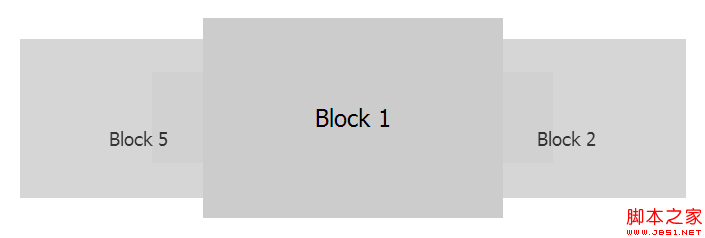
html 代码:
复制代码 代码如下:
<!DOCtypeHTML>
<html lang="en-US">
<head>
<metacharset="UTF-8">
<title>JQuery-roundabout</title>
<style type="text/CSS">
*{padding:0;margin:0;}
body{font:24px tahoma;}
ul{list-style:none;margin:100px auto 0;width:500px;height:200px;}
li{line-height:200px;height:200px;width:300px;background:#ccc;text-align:center;cursor:pointer;}
li.roundabout-in-focus{Cursor:default;}
</style>
</head>
<body>
<ul class="roundabout">
<li>block 1</li>
<li>Block 2</li>
<li>Block 3</li>
<li>Block 4</li>
<li>Block 5</li>
</ul>
</body>
</html>
<script type="text/javascript" src="http://Ajax.googleAPIs.com/ajax/libs/jQuery/1.4.2/jquery.min.JS"></script>
<script type="text/JavaScript" src="js/jquery.roundabout.min.js"></script>
<script type="text/Javascript">
$(function(){
$('.roundabout').roundabout();
});
</script>
关于 roundabout.js 的代码可以去官网上下载,这里就不写了,太长了。点击官网地址。
html 代码:
复制代码 代码如下:
<!DOCtypeHTML>
<html lang="en-US">
<head>
<metacharset="UTF-8">
<title>JQuery-roundabout</title>
<style type="text/CSS">
*{padding:0;margin:0;}
body{font:24px tahoma;}
ul{list-style:none;margin:100px auto 0;width:500px;height:200px;}
li{line-height:200px;height:200px;width:300px;background:#ccc;text-align:center;cursor:pointer;}
li.roundabout-in-focus{Cursor:default;}
</style>
</head>
<body>
<ul class="roundabout">
<li>block 1</li>
<li>Block 2</li>
<li>Block 3</li>
<li>Block 4</li>
<li>Block 5</li>
</ul>
</body>
</html>
<script type="text/javascript" src="http://Ajax.googleAPIs.com/ajax/libs/jQuery/1.4.2/jquery.min.JS"></script>
<script type="text/JavaScript" src="js/jquery.roundabout.min.js"></script>
<script type="text/Javascript">
$(function(){
$('.roundabout').roundabout();
});
</script>
关于 roundabout.js 的代码可以去官网上下载,这里就不写了,太长了。点击官网地址。
相关推荐
- jquery 插件学习(二) - Web前端
- jQuery 数据缓存模块进化史详细介绍 - Web前端
- jQuery Ajax请求状态管理器打包 - Web前端
- jquery 插件学习(三) - Web前端
- jQuery 中使用JSON的实现代码 - Web前端
- 基于jquery实现图片广告轮换效果代码 - Web前端
- jQuery EasyUI API 中文文档 - TimeSpinner时间微调器 - Web前端
- jQuery Ajax 仿AjaxPro.Utility.RegisterTypeForAjax辅助方法 - Web前端
- 自己动手开发jQuery插件教程 - Web前端
- capacityFixed 基于jquery的类似于新浪微博新消息提示的定位框 - Web前端
- 网页前端技术排行
-
- 1[Web前端]用javascript实现默认图片替代未显示的图片 - Web前端
- 2分析Iconfont-阿里巴巴矢量常用图标库 - Web前端
- 3jQuery实例教程:制作网页中可折叠的面板 - Web前端
- 4【第六章】Foundation之按钮和下拉功能 - Web前端
- 5基于jquery的滚动条滚动固定div(附演示下载) - Web前端
- 6jQuery编写widget的一些技巧分享 - Web前端
- 7分享精心挑选的12款优秀jQuery Ajax分页插件和教程 - Web前端
- 8jQuery实现鼠标移到元素上动态提示消息框效果 - Web前端
- 9在Mac/PC上远程调试iPhone/iPad上的网页 - Web前端
- 最近发表
-
- WordPress随机显示特色图片插件:Random Post Thumbnails
- KeePass实现Chrome浏览器自动填充密码方法一
- LNMP一键包nginx 301强制跳转到https教程
- KeePass实现Chrome浏览器自动填充密码方法二
- #建站# 免费的VPS管理软件Xshell8/Xftp8中文版下载
- 使用Xshell 8连接VPS教程_电脑登录vps的方法
- WordPress评论界面添加烟花????效果
- 不同浏览器书签同步方案:坚果云+Floccus_详细使用教程
- iOS端KeePassXC客户端APP:Strongbox Password Safe
- 给WordPress评论中的Gravatar头像图片添加ALT属性