


基于jquery实现的可以编辑选择的下拉框的代码 - Web前端
作者:98wpeu发布时间:2026-07-29分类:网页前端技术浏览:1
导读:效果图:代码如下:复制代码代码如下:<!DOCtypehtmlPUBLIC"-//W3C//DTDxhtml1.0Transitional//EN""htt...
效果图:
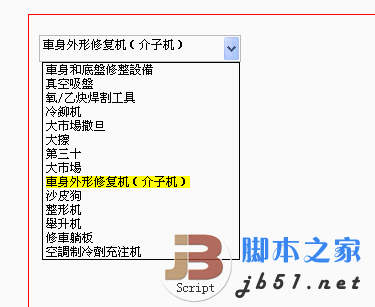
代码如下:
复制代码 代码如下:
<!DOCtypehtml PUBLIC "-//W3C//DTD xhtml 1.0 Transitional//EN" "http://www.w3.org/TR/xHTML1/DTD/xhtml1-transitional.dtd">
<html xmlns="HTTP://www.w3.org/1999/xhtml">
<head>
<title>可以编辑的下来框实现方法--woody.wu</title>
<style type="text/CSS">
.cssinput
{
height: 19px;
padding: 3PX;
padding-left: 3px;
padding-right: 0px;
margin: 0PX;
border: 1PX SOLID #C0C0C0;
font-family: 宋体,arial;
font-size: 9pt;
}
.select_div_list
{
position: absolute;
border: 1px solid black;
background-color: White;
overflow: hidden;
overflow-y: auto;
}
.select_div_list_ul
{
margin: 0px;
padding: 0px;
list-style-type: none;
}
.select_div_list_ul li
{
cursor: pointer;
padding-left: 3px;
font-family: 宋体,arial;
font-size: 9pt; *padding:0px;*height:20px;_height:14px;_margin:0px;_height:14px;*margin:0px;line-height:14px;}
.selectSPAN
{
background-color: Yellow;
}
</style>
<script type="text/javascript" src="JS/JQuery-1.4.2.min.js"></script>
<script type="text/JavaScript">
var inputID = "input1";
var selectID = "select1";
var widt = 0;
var inputWi = 0;
var he = 0;
$(function() {
inputID = "input1";
selectID = "select1";
widt = 200;
inputWi = widt - 20;
he = $("#User").height() - 41;
var offset = $("input[id=input1]").offset();
$("#" + selectID).change(function() {
var newvar = $("#" + selectID).find("option:selected").text();
$("#" + inputID).val(newvar);
}).click(function() {
$("#select_div_on_key" + selectID).remove();
}).css({ "display": "block", "width": widt + "px", "z-index": 1, "clip": "rect(0px " + widt + "px 51px 151px)" });
$("#" + inputID).keyup(function() {
ShowSelectCombo();
}).click(function() {
ShowSelectCombo();
}).css({ "z-index": 2, "width": inputWi + "px" }); ;
});
function ShowSelectCombo() {
var pob = $("#" + inputID);
var v = pob.val();
var off = pob.offset();
var wi = pob.width() + 16;
var tp = off.top + pob.height() - 100 + 7;
var lef = off.left - 200 + 2;
var html = "<div class='select_div_list' id='select_div_on_key" + selectID + "' style='width:" + wi + "px;top:" + tp + "px;left:" + lef + "px;'><ul class='select_div_list_ul'>";
$("#" + selectID).find("option").each(function() {
var tk = $(this);
html += "<li val='" + tk.val() + "' ht='" + encodeURIComponent(tk.html()) + "'>" + tk.html().Replace(v, "<span class='selectSPAN'>" + v + "</span>") + "</li>";
});
html += "</ul></div>";
var ulDIV = $("#select_div_on_key" + selectID);
ulDIV.remove();
$("#user").append(html);
var ulDIV = $("#select_div_on_key" + selectID);
var hei = ulDIV.find("ul").height();
var newHeight = hei > he ? he : hei;
ulDIV.css({ height: newHeight + "px" });
ulDIV.find("li").hover(function() {
$(this).css({ "background-color": "#316ac5" });
}, function() {
$(this).css({ "background-color": "white" });
});
ulDIV.find("li").click(function() {
var ki = $(this);
var va = ki.attr("val");
var htm = ki.attr("ht");
htm = decodeURIComponent(htm);
$("#" + inputID).val(htm);
$("#" + selectID).val(va);
ulDIV.remove();
});
}
</script>
</head>
<body>
<FORM name="form1" method="post" action="qqq.aspx" id="Form1">
<div>
<input type="hidden" name="__VieWSTATE" id="__VIEWSTATE" value="/wEPDwULLTIxMjq5OTYwOTdkZH49VftoWVz/vAIL4f2byf4/w86b" />
</div>
<div>
<input type="hidden" name="__evenTValidation" id="__EVENTVALIDATION" value="/wEWDwL15JrvCgL2jaW0BgL3jaW0BgL0jaW0BgL1jaW0BgLyjaW0BgLzjaW0BgLwjaW0BgLujaW0BgL3jeW3BgKm4u6hCAL3je23BgL3jdG3BgL3jdW3BgL3jdm3BnqAGtu2PbiTi9dWHvWrW6QCqrYo" />
</div>
<div style='position: absolute; top: 100px; width: 500px; left: 200px; padding: 10px;
height: 400px; border: 1px solid red;' id='user'>
<div>
<div style='overflow: hidden; margin-top: 10px; height: 30px;'>
<input id="input1" name="input1" type="text" class='cssINPUT' style='_height: 20px;
*height: 13px; display: block; float: left; position: absolute; border-right: 0px;' />
<select name="select1" id="select1" class="cssINPUT" style="float: left;
display: none; height: 27PX; position: absolute; Cursor: pointer; margin-left: 2px;
padding: 0px;">
<option value="1">車身和底盤修整設備</option>
<option value="2">真空吸盤</option>
<option value="3">氧/乙炔焊割工具</option>
<option value="4">冷鉚机 </option>
<option value="5">大市場撒旦</option>
<option value="6">大擦</option>
<option value="7">第三十</option>
<option value="9">大市場</option>
<option value="20">車身外形修复机(介子机)</option>
<option value="1022">沙皮狗</option>
<option value="22">整形机</option>
<option value="23">舉升机</option>
<option value="24">修車躺板</option>
<option value="25">空調制冷劑充注机 </option>
</select>
</div>
</div>
</form>
</body>
</html>
代码如下:
复制代码 代码如下:
<!DOCtypehtml PUBLIC "-//W3C//DTD xhtml 1.0 Transitional//EN" "http://www.w3.org/TR/xHTML1/DTD/xhtml1-transitional.dtd">
<html xmlns="HTTP://www.w3.org/1999/xhtml">
<head>
<title>可以编辑的下来框实现方法--woody.wu</title>
<style type="text/CSS">
.cssinput
{
height: 19px;
padding: 3PX;
padding-left: 3px;
padding-right: 0px;
margin: 0PX;
border: 1PX SOLID #C0C0C0;
font-family: 宋体,arial;
font-size: 9pt;
}
.select_div_list
{
position: absolute;
border: 1px solid black;
background-color: White;
overflow: hidden;
overflow-y: auto;
}
.select_div_list_ul
{
margin: 0px;
padding: 0px;
list-style-type: none;
}
.select_div_list_ul li
{
cursor: pointer;
padding-left: 3px;
font-family: 宋体,arial;
font-size: 9pt; *padding:0px;*height:20px;_height:14px;_margin:0px;_height:14px;*margin:0px;line-height:14px;}
.selectSPAN
{
background-color: Yellow;
}
</style>
<script type="text/javascript" src="JS/JQuery-1.4.2.min.js"></script>
<script type="text/JavaScript">
var inputID = "input1";
var selectID = "select1";
var widt = 0;
var inputWi = 0;
var he = 0;
$(function() {
inputID = "input1";
selectID = "select1";
widt = 200;
inputWi = widt - 20;
he = $("#User").height() - 41;
var offset = $("input[id=input1]").offset();
$("#" + selectID).change(function() {
var newvar = $("#" + selectID).find("option:selected").text();
$("#" + inputID).val(newvar);
}).click(function() {
$("#select_div_on_key" + selectID).remove();
}).css({ "display": "block", "width": widt + "px", "z-index": 1, "clip": "rect(0px " + widt + "px 51px 151px)" });
$("#" + inputID).keyup(function() {
ShowSelectCombo();
}).click(function() {
ShowSelectCombo();
}).css({ "z-index": 2, "width": inputWi + "px" }); ;
});
function ShowSelectCombo() {
var pob = $("#" + inputID);
var v = pob.val();
var off = pob.offset();
var wi = pob.width() + 16;
var tp = off.top + pob.height() - 100 + 7;
var lef = off.left - 200 + 2;
var html = "<div class='select_div_list' id='select_div_on_key" + selectID + "' style='width:" + wi + "px;top:" + tp + "px;left:" + lef + "px;'><ul class='select_div_list_ul'>";
$("#" + selectID).find("option").each(function() {
var tk = $(this);
html += "<li val='" + tk.val() + "' ht='" + encodeURIComponent(tk.html()) + "'>" + tk.html().Replace(v, "<span class='selectSPAN'>" + v + "</span>") + "</li>";
});
html += "</ul></div>";
var ulDIV = $("#select_div_on_key" + selectID);
ulDIV.remove();
$("#user").append(html);
var ulDIV = $("#select_div_on_key" + selectID);
var hei = ulDIV.find("ul").height();
var newHeight = hei > he ? he : hei;
ulDIV.css({ height: newHeight + "px" });
ulDIV.find("li").hover(function() {
$(this).css({ "background-color": "#316ac5" });
}, function() {
$(this).css({ "background-color": "white" });
});
ulDIV.find("li").click(function() {
var ki = $(this);
var va = ki.attr("val");
var htm = ki.attr("ht");
htm = decodeURIComponent(htm);
$("#" + inputID).val(htm);
$("#" + selectID).val(va);
ulDIV.remove();
});
}
</script>
</head>
<body>
<FORM name="form1" method="post" action="qqq.aspx" id="Form1">
<div>
<input type="hidden" name="__VieWSTATE" id="__VIEWSTATE" value="/wEPDwULLTIxMjq5OTYwOTdkZH49VftoWVz/vAIL4f2byf4/w86b" />
</div>
<div>
<input type="hidden" name="__evenTValidation" id="__EVENTVALIDATION" value="/wEWDwL15JrvCgL2jaW0BgL3jaW0BgL0jaW0BgL1jaW0BgLyjaW0BgLzjaW0BgLwjaW0BgLujaW0BgL3jeW3BgKm4u6hCAL3je23BgL3jdG3BgL3jdW3BgL3jdm3BnqAGtu2PbiTi9dWHvWrW6QCqrYo" />
</div>
<div style='position: absolute; top: 100px; width: 500px; left: 200px; padding: 10px;
height: 400px; border: 1px solid red;' id='user'>
<div>
<div style='overflow: hidden; margin-top: 10px; height: 30px;'>
<input id="input1" name="input1" type="text" class='cssINPUT' style='_height: 20px;
*height: 13px; display: block; float: left; position: absolute; border-right: 0px;' />
<select name="select1" id="select1" class="cssINPUT" style="float: left;
display: none; height: 27PX; position: absolute; Cursor: pointer; margin-left: 2px;
padding: 0px;">
<option value="1">車身和底盤修整設備</option>
<option value="2">真空吸盤</option>
<option value="3">氧/乙炔焊割工具</option>
<option value="4">冷鉚机 </option>
<option value="5">大市場撒旦</option>
<option value="6">大擦</option>
<option value="7">第三十</option>
<option value="9">大市場</option>
<option value="20">車身外形修复机(介子机)</option>
<option value="1022">沙皮狗</option>
<option value="22">整形机</option>
<option value="23">舉升机</option>
<option value="24">修車躺板</option>
<option value="25">空調制冷劑充注机 </option>
</select>
</div>
</div>
</form>
</body>
</html>
- 上一篇:boxy基于jquery的弹出层对话框插件扩展应用 弹出层选择器 - Web前端
- 下一篇:已经是最后一篇了
相关推荐
- boxy基于jquery的弹出层对话框插件扩展应用 弹出层选择器 - Web前端
- jquery下将选择的checkbox的id组成字符串的方法 - Web前端
- jQuery 1.9使用$.support替代$.browser的使用方法 - Web前端
- jQuery)扩展jQuery系列之一 模拟alert,confirm(一) - Web前端
- jquery中this的使用说明 - Web前端
- Web 前端设计模式--Dom重构 提高显示性能 - Web前端
- jQuery获取css z-index在各种浏览器中的返回值 - Web前端
- 使用jQuery jqPlot插件绘制柱状图 - Web前端
- 基于jquery实现漂亮的动态信息提示效果 - Web前端
- jQuery模板技术和数据绑定实现代码 - Web前端
- 网页前端技术排行
-
- 1[Web前端]用javascript实现默认图片替代未显示的图片 - Web前端
- 2分析Iconfont-阿里巴巴矢量常用图标库 - Web前端
- 3【第六章】Foundation之按钮和下拉功能 - Web前端
- 4jQuery实例教程:制作网页中可折叠的面板 - Web前端
- 5基于jquery的滚动条滚动固定div(附演示下载) - Web前端
- 6jQuery编写widget的一些技巧分享 - Web前端
- 7jQuery实现鼠标移到元素上动态提示消息框效果 - Web前端
- 8在Mac/PC上远程调试iPhone/iPad上的网页 - Web前端
- 9分享精心挑选的12款优秀jQuery Ajax分页插件和教程 - Web前端
- 最近发表
-
- WordPress随机显示特色图片插件:Random Post Thumbnails
- KeePass实现Chrome浏览器自动填充密码方法一
- LNMP一键包nginx 301强制跳转到https教程
- KeePass实现Chrome浏览器自动填充密码方法二
- #建站# 免费的VPS管理软件Xshell8/Xftp8中文版下载
- 使用Xshell 8连接VPS教程_电脑登录vps的方法
- WordPress评论界面添加烟花????效果
- 不同浏览器书签同步方案:坚果云+Floccus_详细使用教程
- iOS端KeePassXC客户端APP:Strongbox Password Safe
- 给WordPress评论中的Gravatar头像图片添加ALT属性