


ASP.NET jQuery 实例18 通过使用jQuery validation插件校验DropDownList - Web前端
作者:98wpeu发布时间:2026-07-17分类:网页前端技术浏览:246
导读:先看界面代码:复制代码代码如下:<FORMid="form1"runat="server"><divalign="center"><fi...
先看界面代码:
复制代码 代码如下:
<FORM id="form1" runat="server">
<div align="center">
<fieldset style="width: 350px; height: 200px;">
<tableborder="0" cellpadding="3" cellspacing="3">
<tr>
<td>
请选择汽车类型:
</td>
</tr>
<tr>
<td>
<asp:DropDownlist ID="dllCar" runat="server" ToolTip="至少选择一种车!" CSSclass="reqUIred">
<asp:ListItemvalue="" text="---请选择---"></asp:ListItem>
<asp:ListItem Value="1" Text="奔驰汽车"></asp:ListItem>
<asp:ListItem Value="2" Text="宝马汽车"></asp:ListItem>
<asp:ListItem Value="3" Text="奥迪汽车"></asp:ListItem>
<asp:ListItem Value="4" Text="现代汽车"></asp:ListItem>
<asp:ListItem Value="5" Text="丰田汽车"></asp:ListItem>
</asp:DropDownList>
</td>
</tr>
<tr>
<td>
<asp:Button ID="BTnSubmit" runat="server" Text="提交" />
</td>
</tr>
</table>
</fIEldset>
<div id="message" class="alertmsg">
</div>
</div>
</Form>
DropDownList控件属性ToolTip会转换为title,title的值可以作为校验规则required的提示信息,属性cssClass的值required就指定了插件的校验规则。
脚本代码:
复制代码 代码如下:
<head id="Head1" runat="server">
<title>Recipe18</title>
<scripttype="text/javascript" src="Scripts/JQuery-1.4.1-vsdoc.JS"></script>
<script type="text/JavaScript" src="Scripts/jQuery.Validate.js"></script>
<script type="text/Javascript">
$(function () {
$("#form1").validate({
errorlabelContAIner: $("#message")
});
});
</script>
<style type="text/css">
.alertmsg
{
color: #FF0000;
}
</style>
</head>
显示效果:
另外如果不设置DropDownList的属性ToolTip和CssClass,脚本代码改为如下,也可以实现同样的效果:
复制代码 代码如下:
<script type="text/javascript">
$(function () {
$("#form1").validate({
rules: { dllCar: "required" },
messages: { dllCar: "至少选择一种车!" },
errorLabelContainer: $("#message")
});
});
</script>
复制代码 代码如下:
<FORM id="form1" runat="server">
<div align="center">
<fieldset style="width: 350px; height: 200px;">
<tableborder="0" cellpadding="3" cellspacing="3">
<tr>
<td>
请选择汽车类型:
</td>
</tr>
<tr>
<td>
<asp:DropDownlist ID="dllCar" runat="server" ToolTip="至少选择一种车!" CSSclass="reqUIred">
<asp:ListItemvalue="" text="---请选择---"></asp:ListItem>
<asp:ListItem Value="1" Text="奔驰汽车"></asp:ListItem>
<asp:ListItem Value="2" Text="宝马汽车"></asp:ListItem>
<asp:ListItem Value="3" Text="奥迪汽车"></asp:ListItem>
<asp:ListItem Value="4" Text="现代汽车"></asp:ListItem>
<asp:ListItem Value="5" Text="丰田汽车"></asp:ListItem>
</asp:DropDownList>
</td>
</tr>
<tr>
<td>
<asp:Button ID="BTnSubmit" runat="server" Text="提交" />
</td>
</tr>
</table>
</fIEldset>
<div id="message" class="alertmsg">
</div>
</div>
</Form>
DropDownList控件属性ToolTip会转换为title,title的值可以作为校验规则required的提示信息,属性cssClass的值required就指定了插件的校验规则。
脚本代码:
复制代码 代码如下:
<head id="Head1" runat="server">
<title>Recipe18</title>
<scripttype="text/javascript" src="Scripts/JQuery-1.4.1-vsdoc.JS"></script>
<script type="text/JavaScript" src="Scripts/jQuery.Validate.js"></script>
<script type="text/Javascript">
$(function () {
$("#form1").validate({
errorlabelContAIner: $("#message")
});
});
</script>
<style type="text/css">
.alertmsg
{
color: #FF0000;
}
</style>
</head>
显示效果:
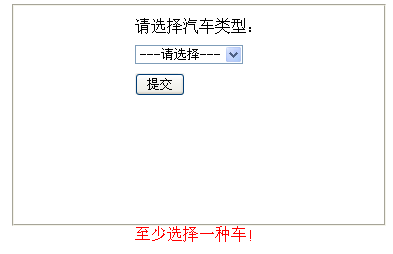
另外如果不设置DropDownList的属性ToolTip和CssClass,脚本代码改为如下,也可以实现同样的效果:
复制代码 代码如下:
<script type="text/javascript">
$(function () {
$("#form1").validate({
rules: { dllCar: "required" },
messages: { dllCar: "至少选择一种车!" },
errorLabelContainer: $("#message")
});
});
</script>
相关推荐
- 使用jQuery实现dropdownlist的联动效果(sharepoint 2007) - Web前端
- 基于jQuery的合并表格中相同文本的相邻单元格的代码 - Web前端
- jQuery实战之品牌展示列表效果 - Web前端
- 40个有创意的jQuery图片和内容滑动及弹出插件收藏集之三 - Web前端
- JQuery中$之选择器用法介绍 - Web前端
- jquery的index方法实现tab效果 - Web前端
- Jquery选择子控件"大于号"和" "区别介绍及使用示例 - Web前端
- jquery插件开发注意事项小结 - Web前端
- 关于javascript中的 “ && ” 和 “ || ”那些事 - Web前端
- jquery 触发a链接点击事件解决方案 - Web前端
- 网页前端技术排行
-
- 1[Web前端]用javascript实现默认图片替代未显示的图片 - Web前端
- 2分析Iconfont-阿里巴巴矢量常用图标库 - Web前端
- 3jQuery实例教程:制作网页中可折叠的面板 - Web前端
- 4【第六章】Foundation之按钮和下拉功能 - Web前端
- 5基于jquery的滚动条滚动固定div(附演示下载) - Web前端
- 6jQuery编写widget的一些技巧分享 - Web前端
- 7在Mac/PC上远程调试iPhone/iPad上的网页 - Web前端
- 8分享精心挑选的12款优秀jQuery Ajax分页插件和教程 - Web前端
- 9jQuery实现鼠标移到元素上动态提示消息框效果 - Web前端
- 最近发表
-
- WordPress随机显示特色图片插件:Random Post Thumbnails
- KeePass实现Chrome浏览器自动填充密码方法一
- LNMP一键包nginx 301强制跳转到https教程
- KeePass实现Chrome浏览器自动填充密码方法二
- #建站# 免费的VPS管理软件Xshell8/Xftp8中文版下载
- 使用Xshell 8连接VPS教程_电脑登录vps的方法
- WordPress评论界面添加烟花????效果
- 不同浏览器书签同步方案:坚果云+Floccus_详细使用教程
- iOS端KeePassXC客户端APP:Strongbox Password Safe
- 给WordPress评论中的Gravatar头像图片添加ALT属性