


jQuery News Ticker 基于jQuery的即时新闻行情展示插件 - Web前端
作者:98wpeu发布时间:2026-07-16分类:网页前端技术浏览:204
导读:效果图:JQuerynewsticker是一个非常方便的jQuery插件,能够快速让你生成这样的一个新闻行情效果。它能够通过列表,html甚至是RSS(只能加载本站的RSS...
效果图:
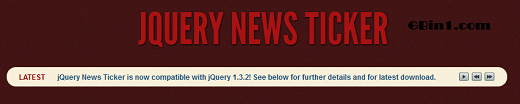
JQuery news ticker是一个非常方便的jQuery插件,能够快速让你生成这样的一个新闻行情效果。
它能够通过列表,html甚至是RSS(只能加载本站的RSS feed)来生成新闻内容,并且支持前后播放和停止。这个插件支持一系列的自定义选项,例如:
播放速度
播放效果
播放方向
显示时间
代码开发简单高效。
首先引入jQuery news ticker类库及其jquery类库:
复制代码 代码如下:
<link href="CSS/ticker-style.css" rel="StyleSheet" type="text/css" />
<script src="jquery.ticker.JS" type="text/javascript"></script>
HTML代码:
复制代码 代码如下:
<div id="ticker-wrAPPer" class="no-js">
<ul id="js-news" class="js-hidden">
<li class="news-item"><a href="#">this is the 1st latest news item.</a></li>
<li class="news-item"><a href="#">This is the 2nd latest news item.</a></li>
<li class="news-item"><a href="#">This is the 3rd latest news item.</a></li>
<li class="news-item"><a href="#">This is the 4th latest news item.</a></li>
</ul>
</div>
JavaScript:
复制代码 代码如下:
<script type="text/Javascript">
$(function () {
$('#js-news').ticker();
});
</script>
官方网站http://www.gbin1.com/technology/jquerynews/20111105jquerypluginnewsticker/demo.html
相关文件下载
JQuery news ticker是一个非常方便的jQuery插件,能够快速让你生成这样的一个新闻行情效果。
它能够通过列表,html甚至是RSS(只能加载本站的RSS feed)来生成新闻内容,并且支持前后播放和停止。这个插件支持一系列的自定义选项,例如:
播放速度
播放效果
播放方向
显示时间
代码开发简单高效。
首先引入jQuery news ticker类库及其jquery类库:
复制代码 代码如下:
<link href="CSS/ticker-style.css" rel="StyleSheet" type="text/css" />
<script src="jquery.ticker.JS" type="text/javascript"></script>
HTML代码:
复制代码 代码如下:
<div id="ticker-wrAPPer" class="no-js">
<ul id="js-news" class="js-hidden">
<li class="news-item"><a href="#">this is the 1st latest news item.</a></li>
<li class="news-item"><a href="#">This is the 2nd latest news item.</a></li>
<li class="news-item"><a href="#">This is the 3rd latest news item.</a></li>
<li class="news-item"><a href="#">This is the 4th latest news item.</a></li>
</ul>
</div>
JavaScript:
复制代码 代码如下:
<script type="text/Javascript">
$(function () {
$('#js-news').ticker();
});
</script>
官方网站http://www.gbin1.com/technology/jquerynews/20111105jquerypluginnewsticker/demo.html
相关文件下载
相关推荐
- jquery的index方法实现tab效果 - Web前端
- Jquery选择子控件"大于号"和" "区别介绍及使用示例 - Web前端
- jquery插件开发注意事项小结 - Web前端
- 关于javascript中的 “ && ” 和 “ || ”那些事 - Web前端
- jquery 触发a链接点击事件解决方案 - Web前端
- jQuery学习笔记(1)--用jQuery实现异步通信(用json传值)具体思路 - Web前端
- Struts2的s:radio标签使用及用jquery添加change事件 - Web前端
- 利用webqq协议使用python登录qq发消息源码参考 - Web前端
- JQuery 图片的展开和伸缩实例讲解 - Web前端
- jQuery仿Excel表格编辑功能的实现代码 - Web前端
- 网页前端技术排行
-
- 1[Web前端]用javascript实现默认图片替代未显示的图片 - Web前端
- 2分析Iconfont-阿里巴巴矢量常用图标库 - Web前端
- 3jQuery实例教程:制作网页中可折叠的面板 - Web前端
- 4【第六章】Foundation之按钮和下拉功能 - Web前端
- 5基于jquery的滚动条滚动固定div(附演示下载) - Web前端
- 6jQuery编写widget的一些技巧分享 - Web前端
- 7在Mac/PC上远程调试iPhone/iPad上的网页 - Web前端
- 8分享精心挑选的12款优秀jQuery Ajax分页插件和教程 - Web前端
- 9jQuery实现鼠标移到元素上动态提示消息框效果 - Web前端
- 最近发表
-
- WordPress随机显示特色图片插件:Random Post Thumbnails
- KeePass实现Chrome浏览器自动填充密码方法一
- LNMP一键包nginx 301强制跳转到https教程
- KeePass实现Chrome浏览器自动填充密码方法二
- #建站# 免费的VPS管理软件Xshell8/Xftp8中文版下载
- 使用Xshell 8连接VPS教程_电脑登录vps的方法
- WordPress评论界面添加烟花????效果
- 不同浏览器书签同步方案:坚果云+Floccus_详细使用教程
- iOS端KeePassXC客户端APP:Strongbox Password Safe
- 给WordPress评论中的Gravatar头像图片添加ALT属性