


Jqurey实现类似EasyUI的页面布局可改变左右的宽度 - Web前端
作者:98wpeu发布时间:2026-07-12分类:网页前端技术浏览:98
导读:截图如下:(可通过移动中间蓝色的条,来改变左右两边div的宽度)具体实现代码如下:<%@PageLanguage="c#"AutoeventWireup=...
截图如下:(可通过移动中间蓝色的条,来改变左右两边div的宽度)
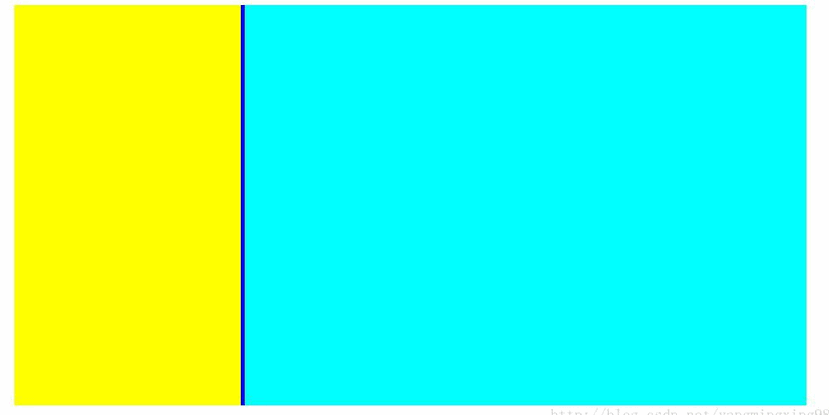
具体实现代码如下:
<%@ Page Language="c#" AutoeventWireup="true" codeFile="Default10.aspx.cs" Inherits="Default10" %>

<!DOCtype html PUBLIC "-//W3C//DTD xhtml 1.0 Transitional//EN" "http://www.w3.org/TR/xHTML1/DTD/xhtml1-transitional.dtd">

<html xmlns="HTTP://www.w3.org/1999/xhtml">
<head id="Head1" runat="server">
<title></title>
<script type="text/javascript" src="JQuery 2.0.3.JS"></script>

<style type="text/CSS">
.highlightTextSearch
{
background-color: Red;
}
a:hover
{
color: Red;
}
.style2
{
width: 1000px;
}
.div
{
Scrollbar-face-color: #DCDCDC; /* 游标的颜色 */
scrollbar-shadow-color: #99BBE8; /*游标边框的颜色*/
scrollbar-highlight-color: #FF3300; /*游标高亮*/
scrollbar-3Dlight-color: #9EBFE8;
scrollbar-darkshadow-color: #9EBFE8;
scrollbar-track-color: #DFE8F6; /*滑动条背景颜色*/
scrollbar-arrow-color: #6699FF; /*箭头颜色*/
}
</style>
</head>
<body>
<FORM id="form1" runat="server">
<div>
<table style="width: 1000px; height: auto" align="center" cellpadding="0" cellspacing="0">
<tr>
<td style="width: 1000px; height: auto" align="center">
<table style="width: 1000px; height: auto">
<tr>
<td style="width: 1000px; height: 670px; overflow: auto" align="left" valign="top">
<div style="overflow: auto; width: 325px; height: 500px; float: left; background-color: Yellow"
id="movemodule" class="div">
</div>
<div id="arrowborder" style="float: left; width: 5px; height: 500px; background-color: Blue;
cursor: w-resize;">
</div>
<div id="rightframe" style="width: 660px; height: 500px; float: left; overflow: auto;
background-color: Aqua" class="div">
</div>
</td>
</tr>
</TABle>
</td>
</tr>
<tr>
<td style="width: 1000px; height: 70px; background-image: url('Images/OAbottom.bmp')"
align="center">
</td>
</tr>
</table>
</div>
<script type="text/JavaScript">
var isDown = false;
var minwidth = 160;
var maxwidth = 800;
$("#arrowborder").mousedown(function ()
{
this.setCapture();
isDown = true;
$("body").css("Cursor", "e-resize");
});
$("body").mouseup(function ()
{
this.releaseCapture();
isDown = false;
$("body").css("cursor", "default");
});
$("body").mouSEMove(function (event)
{
if (isDown) {
var _mx = event.clientX;
//var _my = event.clientY;
var _poin = $("#arrowborder").offset();
var _w = _mx - _poin.left;
var _lw = $("#movemodule").width();
var _rw = $("#rightframe").width();
if ((_lw + _w > minwidth && _w < 0) || (_lw + _w < maxwidth && _w > 0)) {
$("#movemodule").width(_lw + _w);
$("#rightframe").width(_rw - _w);
}
else {
if (_w > 0) {
$("#movemodule").width(maxwidth);
$("#rightframe").width(_rw - (maxwidth - _lw));
}
else {
$("#movemodule").width(minwidth);
$("#rightframe").width(_rw + (_lw - minwidth));
}
}
}
});
</script>
</Form>
</body>
</html>
相关推荐
- Jquery跨浏览器文本复制插件Zero Clipboard的使用方法 - Web前端
- jQuery模拟360浏览器切屏效果幻灯片(附demo源码下载) - Web前端
- jQuery实现控制文字内容溢出用省略号(…)表示的方法 - Web前端
- jQuery iScroll.js 移动端滚动条美化插件第1/5页 - Web前端
- jquery简单插件制作(fn.extend)完整实例 - Web前端
- jQuery实现的左右移动焦点图效果 - Web前端
- Hallo.js基于jQuery UI所见即所得的Web编辑器 - Web前端
- jquery 重写 ajax提交并判断权限后 使用load方法报错解决方法 - Web前端
- jQuery DataTables插件自定义Ajax分页实例解析 - Web前端
- jquery悬浮提示框完整实例 - Web前端
- 网页前端技术排行
-
- 1[Web前端]用javascript实现默认图片替代未显示的图片 - Web前端
- 2分析Iconfont-阿里巴巴矢量常用图标库 - Web前端
- 3jQuery实例教程:制作网页中可折叠的面板 - Web前端
- 4【第六章】Foundation之按钮和下拉功能 - Web前端
- 5基于jquery的滚动条滚动固定div(附演示下载) - Web前端
- 6jQuery编写widget的一些技巧分享 - Web前端
- 7分享精心挑选的12款优秀jQuery Ajax分页插件和教程 - Web前端
- 8jQuery实现鼠标移到元素上动态提示消息框效果 - Web前端
- 9在Mac/PC上远程调试iPhone/iPad上的网页 - Web前端
- 最近发表
-
- WordPress随机显示特色图片插件:Random Post Thumbnails
- KeePass实现Chrome浏览器自动填充密码方法一
- LNMP一键包nginx 301强制跳转到https教程
- KeePass实现Chrome浏览器自动填充密码方法二
- #建站# 免费的VPS管理软件Xshell8/Xftp8中文版下载
- 使用Xshell 8连接VPS教程_电脑登录vps的方法
- WordPress评论界面添加烟花????效果
- 不同浏览器书签同步方案:坚果云+Floccus_详细使用教程
- iOS端KeePassXC客户端APP:Strongbox Password Safe
- 给WordPress评论中的Gravatar头像图片添加ALT属性