


Hallo.js基于jQuery UI所见即所得的Web编辑器 - Web前端
作者:98wpeu发布时间:2026-08-24分类:网页前端技术浏览:2
先看看效果:
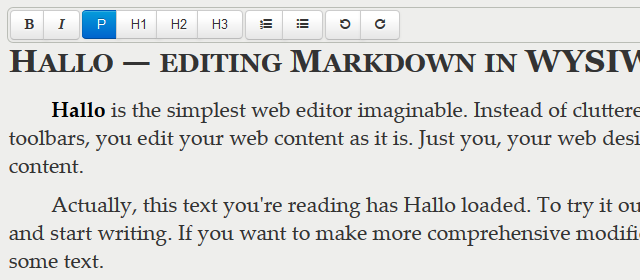
Hallo.JS是一个简单的富文本WEB编辑器,基于JQuery UI并且利用html5的contenteditable实现所见即所得。其目标并不是取代当今非常流行的编辑器,如 TinyMCE 或 Aloha Editor,而是给开发者提供一种更简单、更愉快的用户编辑体验。
Hallo.js是由Henri Bergius为IKS项目开发的一款免费软件,使用CoffeeScript开发,遵循MIT许可协议,托管在GitHub上。
使用方法
1、你需要将jQuery、jquery ui和Rangy库引入到你的项目中:
<script src="js/jquery.min.js"></script>
<script src="js/JQuery-ui.min.js"></script>
<script src="js/rangy-core.js"></script>
编辑器工具栏使用jQuery UI的主题,因此你可能还想自定义一个主题,适合你的需要。工具栏图标字体基于font Awesome。风格的工具栏出现在演示中,你也会想添加一些CSS(如背景和边框)的类hallotoolbar。
<link rel="StyleSheet" href="/path/to/your/jquery-ui.css">
<link rel="stylesheet" href="/path/to/your/font-awesome.css">
引入Hallo.js
<script src="hallo.js"></script>
调用插件是非常简单的
jQuery('p').hallo();
你也可以关闭标签的编辑功能
jQuery('p').hallo({editable: false});
Hallo自己只能使选择的DOM元素可编辑和不提供任何格式的工具。格式是通过加载插件初始化Hallo。即使简单的事情,如粗体和斜体的插件:
jQuery('.editable').hallo({
 plugins: {
  'halloFORMat': {}
 }
});
这个例子可以使简单的格式的插件,提供如粗体和斜体的功能。你可以有很多好的插件为你想,如果有必要通过他们的选择。
Hallo有更多的选项设置当实例化。请参阅文档hallo.coffee文件。
事件方法
Hallo有一些事件,有助于整合和调用。你可以使用jQuery bind订阅它们:
- halloenabled: Triggered when an ediTABle is enabled (editable set to true)
- hallodisabled: Triggered when an editable is disabled (editable set to false)
- hallomodified: Triggered whenever User has changed the contents being edited. event data key content contAIns the html
- halloactivated: Triggered when user activates an editable area (usually by clicking it)
- hallodeactivated: Triggered when user deactivates an editable area
插件
- halloformat – Adds Bold, Italic, StrikeThrough and Underline support to the toolbar. (Enable/Disable with options: “Formattings”: {“bold”: true, “italic”: true, “strikethrough”: true, “underline”: false})
- halloheadings – Adds support for H1, H2, H3. You can pass a headings option key to specify what is going to be displayed (e.g. “formatblocks”:[“p”, “h2″,”h3”])
- hallojustify – Adds align left, center, right support
- hallolists – Adds support for ordered and unordered lists (Pick with options: “lists”: {“ordered”: false, “unordered”: true})
- halloreundo – Adds support for undo and redo
- hallolink – Adds support to add links to a selection (currently not working)
- halloimage – Image uploading, searching, suggestions
- halloblacklist – filtering unwanted tags from the content
编写一个插件
Hallo插件编写正则jQuery UI插件。
当Hallo加载也加载单元所有启用的插件,并通过他们一些额外的选项:
- editable: The main Hallo widget instance
- uuid: unique identifIEr of the Hallo instance, can be used for element IDs
一个简单的插件看起来像以下的:
#  Formatting plugin for Hallo
#  (c) 2011 Henri Bergius, IKS Consortium
#  Hallo may be freely distributed under the MIT license
((jQuery) ->
 jQuery.widget "IKS.halloformat",
  boldElement: null

  options:
   uuid: ''
   editable: Null

  _create: ->
   # Add any actions you want to run on plugin initialization
   # here

  populateToolbar: (toolbar) ->
   # Create an element for holding the button
   @boldElement = jQuery '<span></span>'

   # Use Hallo Button
   @boldElement.hallobutton
    uuid: @options.uuid
    editable: @options.editable
    label: 'Bold'
    # Icons come from Font Awesome
    icon: 'icon-bold'
    # Commands are used for execCommand and queryCommandState
    command: 'bold'

   # append the button to toolbar
   toolbar.APPend @boldElement

  cleanuPContentClone: (element) ->
   # Perform content clean-ups before HTML is sent out

)(jQuery)
以上就是关于Hallo.js富文本编辑器的详细介绍,希望对大家的学习有所帮助。
相关推荐
- jQuery实现的左右移动焦点图效果 - Web前端
- jquery 重写 ajax提交并判断权限后 使用load方法报错解决方法 - Web前端
- jQuery DataTables插件自定义Ajax分页实例解析 - Web前端
- jquery悬浮提示框完整实例 - Web前端
- 实例解析jQuery插件EasyUI最常用的表单验证规则 - Web前端
- jQuery实现的鼠标滑过弹出放大图片特效 - Web前端
- jQuery+JSON实现AJAX二级联动实例分析 - Web前端
- 轻松学习jQuery插件EasyUI EasyUI创建树形菜单 - Web前端
- jQuery给元素添加样式的方法详解 - Web前端
- jQuery简单实现两级下拉菜单效果代码 - Web前端
- 网页前端技术排行
-
- 1[Web前端]用javascript实现默认图片替代未显示的图片 - Web前端
- 2分析Iconfont-阿里巴巴矢量常用图标库 - Web前端
- 3jQuery实例教程:制作网页中可折叠的面板 - Web前端
- 4【第六章】Foundation之按钮和下拉功能 - Web前端
- 5基于jquery的滚动条滚动固定div(附演示下载) - Web前端
- 6jQuery编写widget的一些技巧分享 - Web前端
- 7分享精心挑选的12款优秀jQuery Ajax分页插件和教程 - Web前端
- 8jQuery实现鼠标移到元素上动态提示消息框效果 - Web前端
- 9在Mac/PC上远程调试iPhone/iPad上的网页 - Web前端
- 最近发表
-
- WordPress随机显示特色图片插件:Random Post Thumbnails
- KeePass实现Chrome浏览器自动填充密码方法一
- LNMP一键包nginx 301强制跳转到https教程
- KeePass实现Chrome浏览器自动填充密码方法二
- #建站# 免费的VPS管理软件Xshell8/Xftp8中文版下载
- 使用Xshell 8连接VPS教程_电脑登录vps的方法
- WordPress评论界面添加烟花????效果
- 不同浏览器书签同步方案:坚果云+Floccus_详细使用教程
- iOS端KeePassXC客户端APP:Strongbox Password Safe
- 给WordPress评论中的Gravatar头像图片添加ALT属性