


jQuery中获取checkbox选中项等操作及注意事项 - Web前端
作者:98wpeu发布时间:2026-10-08分类:网页前端技术浏览:72
2. Checkbox选项的全选 反选操作
用于测试的checkbox代码段:
复制代码 代码如下:
<div>
<inputtype="checkbox" name="abc" value="一年级" id="in1" checked="checked" /><label for="in1">一年级</label>
<input type="checkbox" name="abc" value="二年级" id="in2" /><label for="in2">二年级</label>
<input type="checkbox" name="abc" value="三年级" id="in3" /><label for="in3">三年级</label>
<input type="checkbox" name="abc" value="四年级" id="in4" /><label for="in4">四年级</label>
<input type="checkbox" name="abc" value="五年级" id="in5" /><label for="in5">五年级</label>
<input type="checkbox" name="abc" value="六年级" id="in6" /><label for="in6">六年级</label>
<input type="checkbox" name="abc" value="七年级" id="in7" /><label for="in7">七年级</label>
<input type="checkbox" name="abc" value="八年级" id="in8" /><label for="in8">八年级</label>
</div>
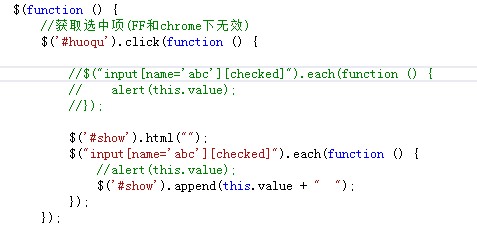
一:首先来说第一点,获取checkbox的选中项。网上搜到的大部分方法使用each来获取:
复制代码 代码如下:
$("input[name='checkbox'][checked]").each(function () {
alert(this.value);
})
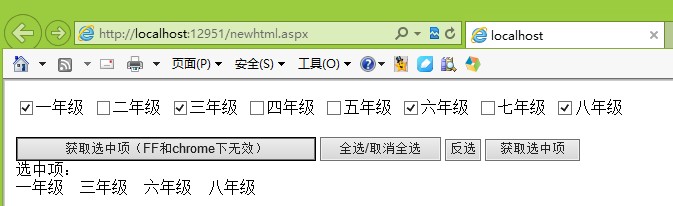
IE下的测试效果(我的是IE10):
IE10下的效果:
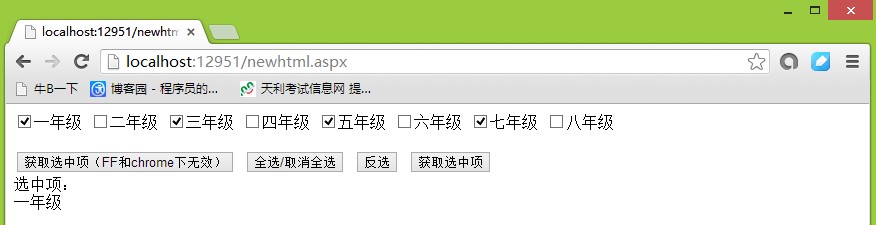
chrome浏览器下的效果:
通过在google上搜索,找到了原因:
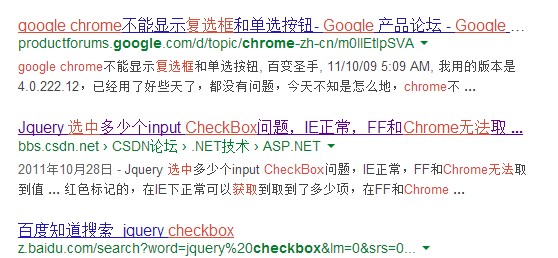
网址: Jquery 选中多少个input CheckBox问题,IE正常,FF和Chrome无法取到值
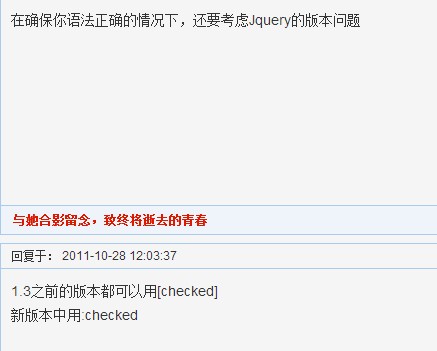
因为我用的JQuery版本是1.7.2的,所以这里我得用 :checked 来获取才行,修改后的代码:
复制代码 代码如下:
//获取选中项
$('#huoqu2').click(function () {
$('#show').html("");
$("input[name='abc']:checked").each(function () {
//alert(this.value);
$('#show').append(this.value + " ");
});
});
在Chrome下的效果:
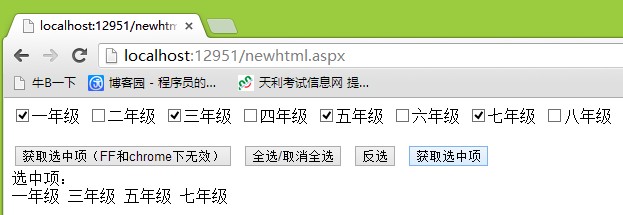
二:checkbox的全选 反选操作:
由于这两个比较简单,我就直接上代码吧:
复制代码 代码如下:
//全选/取消全选
$('#quanxuan').toggle(function () {
$("input[name='abc']").attr("checked", 'true');
}, function () {
$("input[name='abc']").removeAttr("checked");
});
//反选
$('#fanxuan').click(function () {
$("input[name='abc']").each(function () {
if ($(this).attr("checked")) {
$(this).removeAttr("checked");
} else {
$(this).attr("checked", 'true');
}
});
});
再总结一下:
jQuery版本在1.3之前时,获取checkbox的选中项的操作:
复制代码 代码如下:
$("input[name='abc'][checked]").each(function () {
alert(this.value);
});
jquery版本在1.3之后时,获取checkbox的选中项的操作:
复制代码 代码如下:
$("input[name='abc']:checked").each(function () {
alert(this.value);
});
附 完整测试Demo代码:
复制代码 代码如下:
<HTMLxmlns="http://www.w3.org/1999/xhtml">
<head runat="server">
<metaHTTP-eqUIv="Content-Type" content="text/html; charset=utf-8" />
<title></title>
<script src="JS/jquery-1.7.2.min.js"></script>
<script>
$(function () {
//获取选中项(FF和Chrome下无效)
$('#huoqu').click(function () {
//$("input[name='abc'][checked]").each(function () {
// alert(this.value);
//});
$('#show').html("");
$("input[name='abc'][checked]").each(function () {
//alert(this.value);
$('#show').APPend(this.value + " ");
});
});
//获取选中项
$('#huoqu2').click(function () {
$('#show').html("");
$("input[name='abc']:checked").each(function () {
//alert(this.value);
$('#show').append(this.value + " ");
});
});
//全选/取消全选
$('#quanxuan').toggle(function () {
$("input[name='abc']").attr("checked", 'true');
}, function () {
$("input[name='abc']").removeAttr("checked");
});
//反选
$('#fanxuan').click(function () {
$("input[name='abc']").each(function () {
if ($(this).attr("checked")) {
$(this).removeAttr("checked");
} else {
$(this).attr("checked", 'true');
}
});
});
});
</script>
</head>
<body>
<FORM id="form1" runat="server">
<div>
<input type="checkbox" name="abc" value="一年级" id="in1" checked="checked" /><label for="in1">一年级</label>
<input type="checkbox" name="abc" value="二年级" id="in2" /><label for="in2">二年级</label>
<input type="checkbox" name="abc" value="三年级" id="in3" /><label for="in3">三年级</label>
<input type="checkbox" name="abc" value="四年级" id="in4" /><label for="in4">四年级</label>
<input type="checkbox" name="abc" value="五年级" id="in5" /><label for="in5">五年级</label>
<input type="checkbox" name="abc" value="六年级" id="in6" /><label for="in6">六年级</label>
<input type="checkbox" name="abc" value="七年级" id="in7" /><label for="in7">七年级</label>
<input type="checkbox" name="abc" value="八年级" id="in8" /><label for="in8">八年级</label>
</div>
<br />
<input type="button" id="huoqu" value="获取选中项(FF和chrome下无效)" />
<input type="button" id="quanxuan" value="全选/取消全选" />
<input type="button" id="fanxuan" value="反选" />
<input type="button" id="huoqu2" value="获取选中项" />
<br />
选中项: <div id="show">
</div>
</Form>
</body>
</html>
作者:酷小孩
相关推荐
- WordPress 应用:如何修改模版头部文件中的 wp_head() - Web前端
- SEO 优化:YouTube SEO Plugin 提升影片流量 - Web前端
- 使用 React 服务器组件在 Next.js 13 中进行国际化 - Web前端
- 3 个意想不到的技术 SEO 问题示例(以及如何解决它们) - Web前端
- Vue 技术专题:Suspense、路由模式与单元测试实践 - Web前端
- 如何防止 WordPress SQL 注入攻击? - Web前端
- SEO 优化:如何围绕技术SEO框架以构建和制定策略? - Web前端
- SEO优化:YouTube SEO 关键词研究工具 - Web前端
- 2025 年帮助代理机构提升客户业绩的 14 款最佳 SEO 工具 - Web前端
- 客户端:服务器之间设置本地 DNS 服务器 - Web前端
- 网页前端技术排行
-
- 1[Web前端]用javascript实现默认图片替代未显示的图片 - Web前端
- 2分析Iconfont-阿里巴巴矢量常用图标库 - Web前端
- 3jQuery实例教程:制作网页中可折叠的面板 - Web前端
- 4【第六章】Foundation之按钮和下拉功能 - Web前端
- 5基于jquery的滚动条滚动固定div(附演示下载) - Web前端
- 6jQuery实现鼠标移到元素上动态提示消息框效果 - Web前端
- 7分享精心挑选的12款优秀jQuery Ajax分页插件和教程 - Web前端
- 8在Mac/PC上远程调试iPhone/iPad上的网页 - Web前端
- 9jQuery编写widget的一些技巧分享 - Web前端
- 最近发表
-
- WordPress 应用:如何修改模版头部文件中的 wp_head() - Web前端
- SEO 优化:YouTube SEO Plugin 提升影片流量 - Web前端
- 使用 React 服务器组件在 Next.js 13 中进行国际化 - Web前端
- 3 个意想不到的技术 SEO 问题示例(以及如何解决它们) - Web前端
- Vue 技术专题:Suspense、路由模式与单元测试实践 - Web前端
- 如何防止 WordPress SQL 注入攻击? - Web前端
- SEO 优化:如何围绕技术SEO框架以构建和制定策略? - Web前端
- SEO优化:YouTube SEO 关键词研究工具 - Web前端
- 2025 年帮助代理机构提升客户业绩的 14 款最佳 SEO 工具 - Web前端
- 客户端:服务器之间设置本地 DNS 服务器 - Web前端