


基于jquery实现图片广告轮换效果代码 - Web前端
作者:98wpeu发布时间:2026-09-29分类:网页前端技术浏览:98
导读:效果图:实现代码:复制代码代码如下:<!DOCtypehtmlPUBLIC"-//W3C//DTDxhtml1.0Strict//EN""http://www....
效果图:
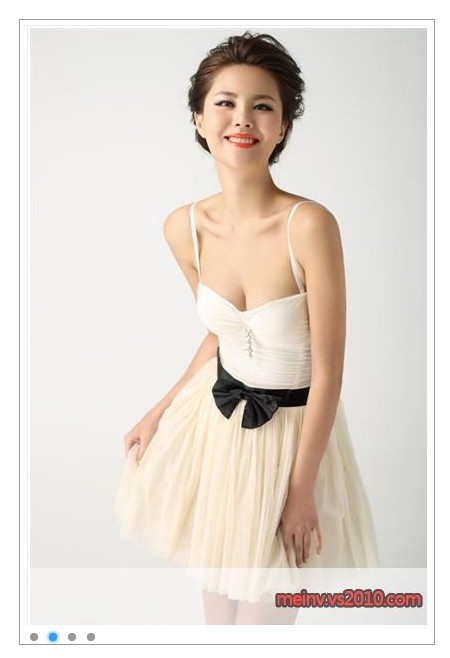
实现代码:
复制代码 代码如下:
<!DOCtypehtml PUBLIC "-//W3C//DTD xhtml 1.0 Strict//EN" "http://www.w3.org/TR/xHTML1/DTD/xhtml1-strict.dtd">
<html xmlns="HTTP://www.w3.org/1999/xhtml">
<head>
<meta http-eqUIv="Content-Type" content="text/html; charset=utf-8" />
<title>hotmarquee</title>
<style type="text/CSS">
*
{
margin: 0;
padding: 0;
}
body
{
font: 12px;
padding-top: 50px;
padding-right: 200px;
padding-bottom: 100px;
padding-left: 200px;
}
ul
{
list-style: none;
}
img
{
padding: 2px;
border: 1px solid #eee;
}
a
{
outline: none;
}
#imgs
{
width: 410px;
margin-right: auto;
margin-left: auto;
}
.top, .BTm
{
background: url(../images/sprite.gif) no-repeat;
overflow: hidden;
}
.top
{
background-position: 0 0;
height: 5px;
}
.btm
{
height: 7px;
}
.mid
{
width: 400px;
padding: 5px 7px 0;
border: 1px solid #999;
}
.mid ul
{
width: 400px;
height: 600px;
background: #fff;
position: relative;
overflow: hidden;
}
.mid ul li
{
width: 400px;
height: 600px;
position: absolute;
left: 490px;
top: 0;
}
.mid ul li.first
{
left: 0;
}
#img_list
{
width: 486px;
height: 20px;
padding-top: 5px;
overflow: hidden;
height: 1%;
}
#img_list a
{
display: block;
width: 14px;
height: 14px;
text-indent: -9999px;
float: left;
margin-right: 5px;
background: url(../images/sPRite.gif) no-repeat 0 -13px;
}
#img_list a:hover, #img_list a.active
{
background-position: -14px -13px;
}
</style>
<script src="../Scripts/JQuery-1.4.1-vsdoc.JS" type="text/javascript"></script>
<script type="text/JavaScript">
var curr = 0, next = 0, count = 0;
$(document).ready(function () {
// 记录图片的数量
count = $('#img_list a').size();
t = SetInterval('imgPlay()', 3000);
// 鼠标移动到图片或导航上停止播放,移开后恢复播放
$('#imgs li, #img_list a').hover(function () {
clearinterval(t);
}, function () {
t = setInterval('imgPlay()', 3000);
});
//点击导航播放到相应的图片
$('#img_list a').click(function () {
// index()函数返回当前导航的下标
var index = $('#img_list a').index(this);
if (curr != index) {
play(index);
curr = index;
};
returnfalse;
});
});
// 播放图片的函数
var imgPlay = function () {
next = curr + 1;
// 若当前图片播放到最后一张,这设置下一张要播放的图片为第一张图片的下标
if (curr == count - 1) next = 0;
play(next);
curr++;
// 在当前图片的下标加1后,若值大于最后一张图片的下标,则设置下一轮其实播放的图片下标为第一张图片的下标,而next永远比curr大1
if (curr > count - 1) { curr = 0; next = curr + 1; }
};
// 控制播放效果的函数
var play = function (next) {
// 当前的图片滑到左边-500px,完成后返回到右边490px
// 下一张图片滑到0px处,完成后导航的焦点切换到下一个点上
$('#imgs li').eq(curr).css({ 'opacity': '0.5' }).Animate({ 'left': '-500px', 'opacity': '1' }, 'slow', function () {
$(this).css({ 'left': '490px' });
}).end()
.eq(next).animate({ 'left': '0px', 'opacity': '1' }, 'slow', function () {
$('#img_list a').siblings('a').removeclass('active').end().eq(next).addClass('active');
});
};
</script>
</head>
<body>
<div id="imgs">
<div class="mid">
<ul>
<li class="first"><a href="http://meinv.vs2010.com/topic/7/201107/show-id2231.html"
target="_blank">
<img src="http://meinv.vs2010.com/Download/2011-7-6/e9c17b8d52e14757b03729fe57dac21f.jpg"
alt="1" /></a></li>
<li><a href="http://meinv.vs2010.com/topic/7/201106/show-id2130.html" target="_blank">
<img src="http://meinv.vs2010.com/DownLoad/2011-7-2/2aaaba4b512c4af9ad335d962ea1b00e.jpg"
alt="2" /></a></li>
<li><a href="http://meinv.vs2010.com/topic/7/201106/show-id2184.html" target="_blank">
<img src="http://meinv.vs2010.com/DownLoad/2011-7-1/622f65f85622417f8c19a47545265c41.jpg"
alt="3" /></a></li>
<li><a href="http://meinv.vs2010.com/topic/7/201106/show-id2163.html" target="_blank">
<img src="http://meinv.vs2010.com/DownLoad/2011-6-25/81575b5f42ff417e85c13f9a77054f8c.jpg"
alt="4" /></a></li>
</ul>
<div id="img_list">
<a href="#1" class="active">1</a> <a href="#2">2</a> <a href="#3">3</a> <a href="#4">
4</a>
</div>
</div>
</div>
</body>
</html>
实现代码:
复制代码 代码如下:
<!DOCtypehtml PUBLIC "-//W3C//DTD xhtml 1.0 Strict//EN" "http://www.w3.org/TR/xHTML1/DTD/xhtml1-strict.dtd">
<html xmlns="HTTP://www.w3.org/1999/xhtml">
<head>
<meta http-eqUIv="Content-Type" content="text/html; charset=utf-8" />
<title>hotmarquee</title>
<style type="text/CSS">
*
{
margin: 0;
padding: 0;
}
body
{
font: 12px;
padding-top: 50px;
padding-right: 200px;
padding-bottom: 100px;
padding-left: 200px;
}
ul
{
list-style: none;
}
img
{
padding: 2px;
border: 1px solid #eee;
}
a
{
outline: none;
}
#imgs
{
width: 410px;
margin-right: auto;
margin-left: auto;
}
.top, .BTm
{
background: url(../images/sprite.gif) no-repeat;
overflow: hidden;
}
.top
{
background-position: 0 0;
height: 5px;
}
.btm
{
height: 7px;
}
.mid
{
width: 400px;
padding: 5px 7px 0;
border: 1px solid #999;
}
.mid ul
{
width: 400px;
height: 600px;
background: #fff;
position: relative;
overflow: hidden;
}
.mid ul li
{
width: 400px;
height: 600px;
position: absolute;
left: 490px;
top: 0;
}
.mid ul li.first
{
left: 0;
}
#img_list
{
width: 486px;
height: 20px;
padding-top: 5px;
overflow: hidden;
height: 1%;
}
#img_list a
{
display: block;
width: 14px;
height: 14px;
text-indent: -9999px;
float: left;
margin-right: 5px;
background: url(../images/sPRite.gif) no-repeat 0 -13px;
}
#img_list a:hover, #img_list a.active
{
background-position: -14px -13px;
}
</style>
<script src="../Scripts/JQuery-1.4.1-vsdoc.JS" type="text/javascript"></script>
<script type="text/JavaScript">
var curr = 0, next = 0, count = 0;
$(document).ready(function () {
// 记录图片的数量
count = $('#img_list a').size();
t = SetInterval('imgPlay()', 3000);
// 鼠标移动到图片或导航上停止播放,移开后恢复播放
$('#imgs li, #img_list a').hover(function () {
clearinterval(t);
}, function () {
t = setInterval('imgPlay()', 3000);
});
//点击导航播放到相应的图片
$('#img_list a').click(function () {
// index()函数返回当前导航的下标
var index = $('#img_list a').index(this);
if (curr != index) {
play(index);
curr = index;
};
returnfalse;
});
});
// 播放图片的函数
var imgPlay = function () {
next = curr + 1;
// 若当前图片播放到最后一张,这设置下一张要播放的图片为第一张图片的下标
if (curr == count - 1) next = 0;
play(next);
curr++;
// 在当前图片的下标加1后,若值大于最后一张图片的下标,则设置下一轮其实播放的图片下标为第一张图片的下标,而next永远比curr大1
if (curr > count - 1) { curr = 0; next = curr + 1; }
};
// 控制播放效果的函数
var play = function (next) {
// 当前的图片滑到左边-500px,完成后返回到右边490px
// 下一张图片滑到0px处,完成后导航的焦点切换到下一个点上
$('#imgs li').eq(curr).css({ 'opacity': '0.5' }).Animate({ 'left': '-500px', 'opacity': '1' }, 'slow', function () {
$(this).css({ 'left': '490px' });
}).end()
.eq(next).animate({ 'left': '0px', 'opacity': '1' }, 'slow', function () {
$('#img_list a').siblings('a').removeclass('active').end().eq(next).addClass('active');
});
};
</script>
</head>
<body>
<div id="imgs">
<div class="mid">
<ul>
<li class="first"><a href="http://meinv.vs2010.com/topic/7/201107/show-id2231.html"
target="_blank">
<img src="http://meinv.vs2010.com/Download/2011-7-6/e9c17b8d52e14757b03729fe57dac21f.jpg"
alt="1" /></a></li>
<li><a href="http://meinv.vs2010.com/topic/7/201106/show-id2130.html" target="_blank">
<img src="http://meinv.vs2010.com/DownLoad/2011-7-2/2aaaba4b512c4af9ad335d962ea1b00e.jpg"
alt="2" /></a></li>
<li><a href="http://meinv.vs2010.com/topic/7/201106/show-id2184.html" target="_blank">
<img src="http://meinv.vs2010.com/DownLoad/2011-7-1/622f65f85622417f8c19a47545265c41.jpg"
alt="3" /></a></li>
<li><a href="http://meinv.vs2010.com/topic/7/201106/show-id2163.html" target="_blank">
<img src="http://meinv.vs2010.com/DownLoad/2011-6-25/81575b5f42ff417e85c13f9a77054f8c.jpg"
alt="4" /></a></li>
</ul>
<div id="img_list">
<a href="#1" class="active">1</a> <a href="#2">2</a> <a href="#3">3</a> <a href="#4">
4</a>
</div>
</div>
</div>
</body>
</html>
相关推荐
- React Native里怎么用Axios发请求?从基础到实战全解答 - Web前端
- axios api service 是什么?和直接用 axios 发请求有啥区别? - Web前端
- 一文了解 Vue + Axios 实现 CRUD 的逻辑 - Web前端
- axios 中如何处理 x-api-token?作用、配置与避坑全解析 - Web前端
- 微信小程序里button的disabled怎么用?常见问题全解答 - Web前端
- 小程序里的block到底有啥用?怎么用能少踩坑? - Web前端
- 询问 SEO:XML 站点地图还是 HTML 站点地图更适合 SEO? - Web前端
- 微信小程序里按钮怎么居中?这些实用方法帮你轻松实现 - Web前端
- 微信小程序里button怎么实现click功能?从绑定到实战全解析 - Web前端
- 询问 SEO:数字公关或传统链接建设,哪个更好? - Web前端
- 网页前端技术排行
-
- 1[Web前端]用javascript实现默认图片替代未显示的图片 - Web前端
- 2分析Iconfont-阿里巴巴矢量常用图标库 - Web前端
- 3jQuery实例教程:制作网页中可折叠的面板 - Web前端
- 4【第六章】Foundation之按钮和下拉功能 - Web前端
- 5基于jquery的滚动条滚动固定div(附演示下载) - Web前端
- 6分享精心挑选的12款优秀jQuery Ajax分页插件和教程 - Web前端
- 7jQuery编写widget的一些技巧分享 - Web前端
- 8jQuery实现鼠标移到元素上动态提示消息框效果 - Web前端
- 9在Mac/PC上远程调试iPhone/iPad上的网页 - Web前端
- 最近发表
-
- WordPress随机显示特色图片插件:Random Post Thumbnails
- KeePass实现Chrome浏览器自动填充密码方法一
- LNMP一键包nginx 301强制跳转到https教程
- KeePass实现Chrome浏览器自动填充密码方法二
- #建站# 免费的VPS管理软件Xshell8/Xftp8中文版下载
- 使用Xshell 8连接VPS教程_电脑登录vps的方法
- WordPress评论界面添加烟花????效果
- 不同浏览器书签同步方案:坚果云+Floccus_详细使用教程
- iOS端KeePassXC客户端APP:Strongbox Password Safe
- 给WordPress评论中的Gravatar头像图片添加ALT属性