


jQuery Ajax 仿AjaxPro.Utility.RegisterTypeForAjax辅助方法 - Web前端
作者:98wpeu发布时间:2026-09-29分类:网页前端技术浏览:72
导读:在某项目中,设计模板字段引擎,采用html+JQuery实现,这里的数据就难免需要Ajax获取,但是团队对于JS掌握不一,所以我写了下面辅助类,可以像ajaxPRo一样简化ajax...
在某项目中,设计模板字段引擎,采用html+JQuery实现,这里的数据就难免需要Ajax获取,但是团队对于JS掌握不一,所以我写了下面辅助类,可以像ajaxPRo一样简化ajax的开发。
代码-jQueryInvokemethodattribute (此处只做标示方法处理,所以为空):
复制代码 代码如下:
[AttributeUsage(AttributeTargets.Method, AllowMultiple=false,Inherited=false)]
public classjqueryInvokeMethodAttribute : Attribute
{
}
代码-jqueryAjaxUtility(分注册脚本和调用ajax事件):
复制代码 代码如下:
using System;
using System.Collections.Generic;
using System.Linq;
using System.text;
namespace Green.Utility
{
public class JQueryAjaxUtility
{
public static string AjaxInvokeParam = "AjaxInvoke";
public static String AjaxInvokevalue = "1";
public static string Responsecharset = "UTF-8";
protected static System.WEB.UI.Page Page
{
get
{
return System.Web.httpContext.Current.Handler as System.Web.ui.Page;
}
}
public static void RegisterclientAjaxScript(type type)
{
if (Page != null)
{
if (System.Web.HTTPContext.Current.Request[AjaxInvokeParam] == AjaxInvokeValue)
{
RegisterAjaxInvokeevent(type);
}
else
{
RegisterAjaxInvokeScript(type);
}
}
}
protected static void RegisterAjaxInvokeScript(Type type)
{
Page.ClientScript.RegisterClIEntScriptblock(type.GetType(), type.GetType().FullName + "_" + typeof(jQueryAjaxUtility).FullName + "_AjaxInvokeDefaultOption", "window.defaultAjaxOption={type:'GET',CAChe:false, dataType:'text'};", true);
if (!jQueryUtilityCache.Current.Exists(type))
{
var methodinfo = type.GetMethods(System.reflection.bindingFlags.IgnoreCase | System.Reflection.BindingFlags.Static | System.Reflection.BindingFlags.Public).Where(t =>
{
var attrs = t.GetcustomAttributes(typeof(jQueryInvokeMethodAttribute), false);
if (attrs != Null && attrs.length > 0)
return true;
return false;
}).Tolist();
if (methodinfo != null && methodinfo.Count > 0)
{
System.Text.StringBuilder sb = new StringBuilder();
sb.appendFORMat(" window.{0}=function(){{}}; ", type.Name);
methodinfo.forEach(t =>
{
var parameters = t.GetParameters().select(p => p.Name).ToArray();
sb.APPendformat(" {2}.{0} = function ({1} ajaxOption) {{", t.Name, parameters.Count() > 0 ? string.join(",", parameters) + "," : "", type.Name);
sb.append("if(ajaxOption==null||typeof ajaxOption=='undefined'){ajaxOption={};};");
var url = Page.Request.RawUrl.indexof("?") == -1 ? Page.Request.RawUrl : Page.Request.RawUrl.Substring(0, Page.Request.RawUrl.IndexOf("?") );
sb.AppendFormat("ajaxOption.url = '{0}';", url);
var data = "''";
if (parameters.Count() > 0)
{
data = (string.Join(" ", parameters.Select(p => string.Format("'&{0}=' + {0}+", p)).Toarray()));
data= data.TrimEnd('+');
}
sb.AppendFormat("ajaxOption.data = 'method={1}&rn={4}&{2}={3}'+{0};", data, t.Name, AjaxInvokeParam, AjaxInvokeValue,Guid.NewGuid().toString());
sb.Append("ajaxOption= jQuery.extend(window.defaultAjaxOption,ajaxOption);");
sb.Append("jQuery.ajax(ajaxOption);};");
});
jQueryUtilityCache.Current.AddScript(type, sb.ToString());
}
}
var script = jQueryUtilityCache.Current.GetScript(type);
Page.ClientScript.RegisterClientScriptBlock(type.GetType(), type.GetType().FullName + "_" + typeof(jQueryAjaxUtility).FullName + "_AjaxInvoke", script, true);
}
protected string GenertorScript(Type type)
{
return string.Empty;
}
protected static void RegisterAjaxInvokeEvent(Type type)
{
var Request = System.Web.HttPContext.Current.Request;
var Response = System.Web.Httpcontext.Current.Response;
var method = Request["method"];
if (string.IsNullOrempty(method))
return;
Response.Clear();
var methodinfo = type.GetMethod(method, System.Reflection.BindingFlags.IgnoreCase | System.Reflection.BindingFlags.Static | System.Reflection.BindingFlags.Public);
if (methodinfo != null)
{
Response.Charset = ResponseCharset;
Response.ContentType = string.Join(",", Request.AcceptTypes);
var param = methodinfo.GetParameters();
Object[] objs = new object[param.Length];
var i = 0;
param.ToList().Foreach(t =>
{
objs[i++] = Convert.ChangeType(Request[t.Name], t.ParameterType);
});
var obj = methodinfo.Invoke(null, objs);
if (obj != null)
{
//序列化
if (!obj.GetType().IsValueType && obj.GetType() != typeof(string))
{
if (Request.AcceptTypes.ContAIns("text/xml"))
{
Response.Write(Green.Utility.SerializerUtility.XmlSerializer(obj));
}
else if (Request.AcceptTypes.Contains("application/json"))
{
Response.ContentType = "application/JSON, text/javascript, */*";
Response.Write(Green.Utility.SerializerUtility.JsonSerializer(obj));
}
else
{
Response.Write(obj);
}
}
else
{
Response.Write(obj);
}
}
Response.Flush();
Response.Close();
Response.End();
}
}
}
}
为了考虑反射的性能,加入了类级注册脚本方法缓存处理jQueryUtilityCache,具体见demo。
测试:
HTML:
复制代码 代码如下:
<form id="form1" runat="server">
<div>
<input id="Button1" type="button" value="button" />
</div>
</form>
后台方法注册Page_load
复制代码 代码如下:
Green.Utility.jQueryAjaxUtility.RegisterClientAjaxScript(typeof(_Default));
1:
前台:
复制代码 代码如下:
_Default.Test("ajax",
{
success: function(e) {
alert(e);
},
dataType: "text"
});
后台:
复制代码 代码如下:
[Green.Utility.jQueryInvokeMethod()]
public static string Test(string str)
{
return "hello:" + str;
}
代码-jQueryInvokemethodattribute (此处只做标示方法处理,所以为空):
复制代码 代码如下:
[AttributeUsage(AttributeTargets.Method, AllowMultiple=false,Inherited=false)]
public classjqueryInvokeMethodAttribute : Attribute
{
}
代码-jqueryAjaxUtility(分注册脚本和调用ajax事件):
复制代码 代码如下:
using System;
using System.Collections.Generic;
using System.Linq;
using System.text;
namespace Green.Utility
{
public class JQueryAjaxUtility
{
public static string AjaxInvokeParam = "AjaxInvoke";
public static String AjaxInvokevalue = "1";
public static string Responsecharset = "UTF-8";
protected static System.WEB.UI.Page Page
{
get
{
return System.Web.httpContext.Current.Handler as System.Web.ui.Page;
}
}
public static void RegisterclientAjaxScript(type type)
{
if (Page != null)
{
if (System.Web.HTTPContext.Current.Request[AjaxInvokeParam] == AjaxInvokeValue)
{
RegisterAjaxInvokeevent(type);
}
else
{
RegisterAjaxInvokeScript(type);
}
}
}
protected static void RegisterAjaxInvokeScript(Type type)
{
Page.ClientScript.RegisterClIEntScriptblock(type.GetType(), type.GetType().FullName + "_" + typeof(jQueryAjaxUtility).FullName + "_AjaxInvokeDefaultOption", "window.defaultAjaxOption={type:'GET',CAChe:false, dataType:'text'};", true);
if (!jQueryUtilityCache.Current.Exists(type))
{
var methodinfo = type.GetMethods(System.reflection.bindingFlags.IgnoreCase | System.Reflection.BindingFlags.Static | System.Reflection.BindingFlags.Public).Where(t =>
{
var attrs = t.GetcustomAttributes(typeof(jQueryInvokeMethodAttribute), false);
if (attrs != Null && attrs.length > 0)
return true;
return false;
}).Tolist();
if (methodinfo != null && methodinfo.Count > 0)
{
System.Text.StringBuilder sb = new StringBuilder();
sb.appendFORMat(" window.{0}=function(){{}}; ", type.Name);
methodinfo.forEach(t =>
{
var parameters = t.GetParameters().select(p => p.Name).ToArray();
sb.APPendformat(" {2}.{0} = function ({1} ajaxOption) {{", t.Name, parameters.Count() > 0 ? string.join(",", parameters) + "," : "", type.Name);
sb.append("if(ajaxOption==null||typeof ajaxOption=='undefined'){ajaxOption={};};");
var url = Page.Request.RawUrl.indexof("?") == -1 ? Page.Request.RawUrl : Page.Request.RawUrl.Substring(0, Page.Request.RawUrl.IndexOf("?") );
sb.AppendFormat("ajaxOption.url = '{0}';", url);
var data = "''";
if (parameters.Count() > 0)
{
data = (string.Join(" ", parameters.Select(p => string.Format("'&{0}=' + {0}+", p)).Toarray()));
data= data.TrimEnd('+');
}
sb.AppendFormat("ajaxOption.data = 'method={1}&rn={4}&{2}={3}'+{0};", data, t.Name, AjaxInvokeParam, AjaxInvokeValue,Guid.NewGuid().toString());
sb.Append("ajaxOption= jQuery.extend(window.defaultAjaxOption,ajaxOption);");
sb.Append("jQuery.ajax(ajaxOption);};");
});
jQueryUtilityCache.Current.AddScript(type, sb.ToString());
}
}
var script = jQueryUtilityCache.Current.GetScript(type);
Page.ClientScript.RegisterClientScriptBlock(type.GetType(), type.GetType().FullName + "_" + typeof(jQueryAjaxUtility).FullName + "_AjaxInvoke", script, true);
}
protected string GenertorScript(Type type)
{
return string.Empty;
}
protected static void RegisterAjaxInvokeEvent(Type type)
{
var Request = System.Web.HttPContext.Current.Request;
var Response = System.Web.Httpcontext.Current.Response;
var method = Request["method"];
if (string.IsNullOrempty(method))
return;
Response.Clear();
var methodinfo = type.GetMethod(method, System.Reflection.BindingFlags.IgnoreCase | System.Reflection.BindingFlags.Static | System.Reflection.BindingFlags.Public);
if (methodinfo != null)
{
Response.Charset = ResponseCharset;
Response.ContentType = string.Join(",", Request.AcceptTypes);
var param = methodinfo.GetParameters();
Object[] objs = new object[param.Length];
var i = 0;
param.ToList().Foreach(t =>
{
objs[i++] = Convert.ChangeType(Request[t.Name], t.ParameterType);
});
var obj = methodinfo.Invoke(null, objs);
if (obj != null)
{
//序列化
if (!obj.GetType().IsValueType && obj.GetType() != typeof(string))
{
if (Request.AcceptTypes.ContAIns("text/xml"))
{
Response.Write(Green.Utility.SerializerUtility.XmlSerializer(obj));
}
else if (Request.AcceptTypes.Contains("application/json"))
{
Response.ContentType = "application/JSON, text/javascript, */*";
Response.Write(Green.Utility.SerializerUtility.JsonSerializer(obj));
}
else
{
Response.Write(obj);
}
}
else
{
Response.Write(obj);
}
}
Response.Flush();
Response.Close();
Response.End();
}
}
}
}
为了考虑反射的性能,加入了类级注册脚本方法缓存处理jQueryUtilityCache,具体见demo。
测试:
HTML:
复制代码 代码如下:
<form id="form1" runat="server">
<div>
<input id="Button1" type="button" value="button" />
</div>
</form>
后台方法注册Page_load
复制代码 代码如下:
Green.Utility.jQueryAjaxUtility.RegisterClientAjaxScript(typeof(_Default));
1:
前台:
复制代码 代码如下:
_Default.Test("ajax",
{
success: function(e) {
alert(e);
},
dataType: "text"
});
后台:
复制代码 代码如下:
[Green.Utility.jQueryInvokeMethod()]
public static string Test(string str)
{
return "hello:" + str;
}
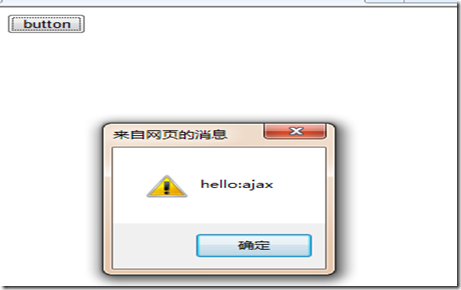
效果:
2:前台ajax:
复制代码 代码如下:
_Default.TestArrayJson(1, 2, 3,
{
success: function(e) {
$.each(e, function(i, n) { alert(n); });
},
dataType: "json"
})
后台:
复制代码 代码如下:
[Green.Utility.jQueryInvokeMethod()]
public static int[] TestArrayJson(int p1, int p2, int p3)
{
return new int[] { p1, p2, p3 };
}
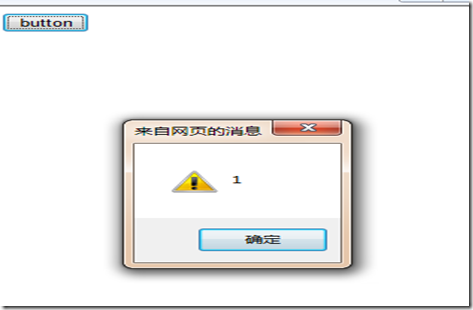
效果:
3:前台ajax:
复制代码 代码如下:
_Default.TestArrayxml("key", "value",
{
success: function(e) {
alert(e.key);
alert(e.Value);
},
dataType: "json"
})
后台:
复制代码 代码如下:
[Green.Utility.jQueryInvokeMethod()]
public static Test TestArrayxml(string key,string value)
{
return new Test() { key=key,Value=value};
}
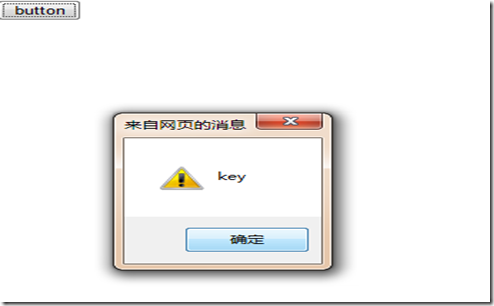
效果:
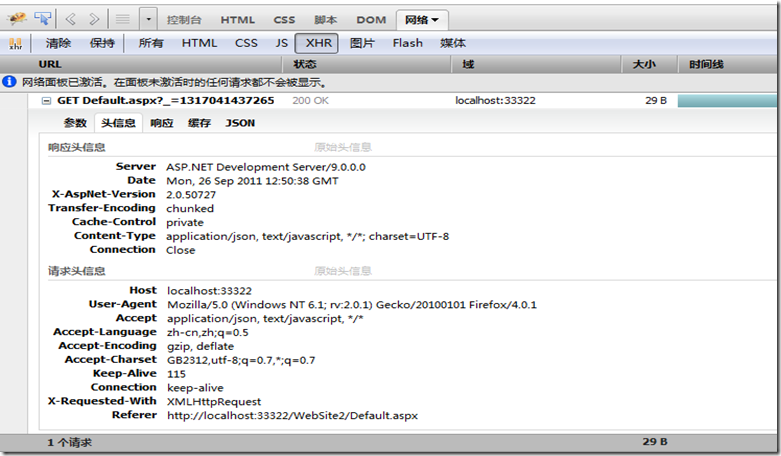
最后看看Firebug中ajax http头信息:
附录:代码下载
作者:破 狼 (cnblogs)
相关推荐
- 跨域请求之jQuery的ajax jsonp的使用解惑 - Web前端
- 基于JQuery的抓取博客园首页RSS的代码 - Web前端
- jQuery AjaxQueue改进步骤 - Web前端
- jquery利用event.which方法获取键盘输入值的代码 - Web前端
- select标签模拟/美化方法采用JS外挂式插件 - Web前端
- jquery 回车事件实现代码 - Web前端
- JQuery动态创建DOM、表单元素的实现代码 - Web前端
- 读jQuery之五(取DOM元素) - Web前端
- jquery中:input和input的区别分析 - Web前端
- Jsonp 跨域的原理以及Jquery的解决方案 - Web前端
- 网页前端技术排行
-
- 1[Web前端]用javascript实现默认图片替代未显示的图片 - Web前端
- 2分析Iconfont-阿里巴巴矢量常用图标库 - Web前端
- 3jQuery实例教程:制作网页中可折叠的面板 - Web前端
- 4【第六章】Foundation之按钮和下拉功能 - Web前端
- 5基于jquery的滚动条滚动固定div(附演示下载) - Web前端
- 6jQuery编写widget的一些技巧分享 - Web前端
- 7分享精心挑选的12款优秀jQuery Ajax分页插件和教程 - Web前端
- 8在Mac/PC上远程调试iPhone/iPad上的网页 - Web前端
- 9jQuery实现鼠标移到元素上动态提示消息框效果 - Web前端
- 最近发表
-
- WordPress随机显示特色图片插件:Random Post Thumbnails
- KeePass实现Chrome浏览器自动填充密码方法一
- LNMP一键包nginx 301强制跳转到https教程
- KeePass实现Chrome浏览器自动填充密码方法二
- #建站# 免费的VPS管理软件Xshell8/Xftp8中文版下载
- 使用Xshell 8连接VPS教程_电脑登录vps的方法
- WordPress评论界面添加烟花????效果
- 不同浏览器书签同步方案:坚果云+Floccus_详细使用教程
- iOS端KeePassXC客户端APP:Strongbox Password Safe
- 给WordPress评论中的Gravatar头像图片添加ALT属性