


Jquery ThickBox插件使用心得(不建议使用) - Web前端
作者:98wpeu发布时间:2026-09-26分类:网页前端技术浏览:112
导读:大家可以使用官方推荐的一下几个插件复制代码代码如下:whileThickboxhaditsday,itisnotmaintAInedanylonger,so...
大家可以使用官方推荐的一下几个插件
复制代码 代码如下:
while Thickbox had its day, it is not maintAIned any longer, so we recommend you use some alterNatives.
* colorbox
* JQueryUI Dialog
* fancybox
* DOMwindow
* shadowbox.JS
做项目中发现facebox如果快速单击两下,容易出现黑屏。而且facebox的框架是用table写的,可能因为table相对div在结构方面更稳定些。如果弹出层里是TABle布局的,样式就会受到facebox的样式影响,还要重新reset一下。
看了下官方的API,我研究了下,做了个整理。看下图:
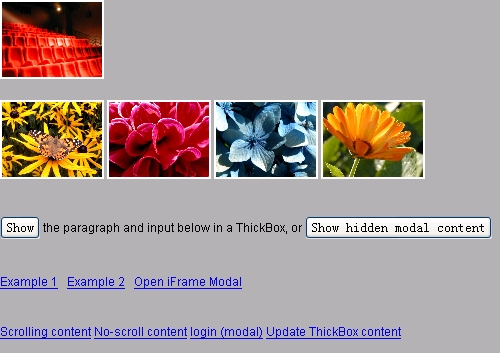
附件中index.html是主页,其它页面都是调用页面。点击index页面,就能看到如图的页面。图、按钮、文字都是可以点的。需要点击的标签都要加上class="thickbox"。当页面出现滚动条时,弹出层固定在窗口的正中间不会移动。当弹出层中只是图片时,图片大小会根据当前窗口的大小进行压缩。所有的弹出层都可以按"esc"退出,除了需要点确认的弹出层外,点击弹出层以外的地方都可以关闭弹出层。
1.展示图片(单张):
复制代码 代码如下:
<a href="images/single.jpg" title="add a caption to title attribute / or leave blank" class="thickbox">
<img src="images/single.jpg" alt="Plant" width="100" height="75" />
</a>
2.展示图片(多张):
复制代码 代码如下:
<a href="images/plant1.jpg" title="add a caption to title attribute / or leave blank" class="thickbox" rel="flowers">
<img src="images/plant1.jpg" alt="Plant 1" width="100" height="75"/>
</a>
<a href="images/plant2.jpg" title="add a caption to title attribute / or leave blank" class="thickbox" rel="flowers">
<img src="images/plant2.jpg" alt="Plant 2" width="100" height="75"/>
</a>
<a href="images/plant3.jpg" title="add a caption to title attribute / or leave blank" class="thickbox" rel="flowers">
<img src="images/plant3.jpg" alt="Plant 3" width="100" height="75"/>
</a>
<a href="images/plant4.jpg" title="add a caption to title attribute / or leave blank" class="thickbox" rel="flowers">
<img src="images/plant4.jpg" alt="Plant 4" width="100" height="75"/>
</a>
这里每个a都要加上rel属性,而且属性值要一样。前后展示图可以通过" > "和" < "来切换
3.弹出层内容在当前页面中时:
复制代码 代码如下:
<input alt="#TB_inline?height=150&width=400&inlineId=myOnPageContent" title="add a caption to title attribute / or leave blank" class="thickbox" value="Show" type="button">
the paragraph and input below in a ThickBox, or
<input alt="#TB_inline?height=155&width=300&inlineId=hiddenModalContent&modal=true" title="add a caption to title attribute / or leave blank" class="thickbox" value="Show hidden modal content" type="button">
<div id="myOnPageContent" style="display:none;">
<p>Lorem ipsum dolor sit amet, consectetuer adipiscing elit, sed diam nonummy nibh euismod tincidunt ut laoreet dolore magna aliquam erat volutpat. Ut wisi enim ad minim veniam, quis nostrud exerci tation ullamcorper suscipit lobortis nisl ut aliquip ex ea commodo consequat.</p>
<p><select name=""><option>test</option></select></p>
</div>
<div id="hiddenModalContent" style="display:none;">
<p>Lorem ipsum dolor sit amet, consectetuer adipiscing elit, sed diam nonummy nibh euismod tincidunt ut laoreet dolore magna aliquam erat volutpat. Ut wisi enim ad minim veniam, quis nostrud exerci tation ullamcorper suscipit lobortis nisl ut aliquip ex ea commodo consequat.</p>
<p style="text-align: center;"><input type="submit" onclick="tb_remove()" value=" Ok " id="Login"/></p>
</div>
第一个input点开的弹出层有input框、title和操作按钮以及文字。第二个input点开的弹出层只有文字。
弹出层的大小是根据input的alt属性里的width和height值来定义的。下面讲到的几种情况也是这样来定义弹出层大小的。
4.调用外部文件,弹出层是iframe
复制代码 代码如下:
<a href="AjaxFrame.PHP?keepthis=true&TB_iframe=true&height=250&width=400" title="add a caption to title attribute / or leave blank" class="thickbox">Example 1</a>
<a href="ajaxoverflow2.HTML?keepThis=true&TB_iframe=true&height=300&width=500" title="add a caption to title attribute / or leave blank" class="thickbox">Example 2</a>
<a href="iframeModal.html?placeValuesBeforeTB_=savedValues&TB_iframe=true&height=200&width=300&modal=true" title="add a caption to title attribute / or leave blank" class="thickbox">Open iFrame Modal</a>
如果弹出层是嵌套在iframe里需要添加“TB_iframe=true"。
第一个是调用ajaxFrame.php文件。
第二个是调用ajaxOverFlow2.html文件。
第三个是调用了iframeModal.html文件,隐藏了title和操作按钮。
5.调用外部文件,弹出层不是iframe
复制代码 代码如下:
<a href="ajaxOverFlow.html?height=300&width=400" title="add a caption to title attribute / or leave blank" class="thickbox">scrolling content</a>
<a href="ajax.PHP?height=220&width=400" class="thickbox" title="add a caption to title attribute / or leave blank">No-scroll content</a>
<a href="ajaxLogin.html?height=85&width=250&modal=true" class="thickbox" title="Please Sign In">login (modal)</a>
<a href="ajaxTBcontent.html?height=200&width=300" class="thickbox" title="">Update ThickBox content</a>
第一个调用ajaxOverFlow.html文件。
第二个调用ajax.PHP文件。
第三个调用ajaxLogin.html文件,FORM表单。
第四个调用ajaxTBcontent.html文件,弹出层里再调用newTBcontent.html文件。
复制代码 代码如下:
while Thickbox had its day, it is not maintAIned any longer, so we recommend you use some alterNatives.
* colorbox
* JQueryUI Dialog
* fancybox
* DOMwindow
* shadowbox.JS
做项目中发现facebox如果快速单击两下,容易出现黑屏。而且facebox的框架是用table写的,可能因为table相对div在结构方面更稳定些。如果弹出层里是TABle布局的,样式就会受到facebox的样式影响,还要重新reset一下。
看了下官方的API,我研究了下,做了个整理。看下图:
附件中index.html是主页,其它页面都是调用页面。点击index页面,就能看到如图的页面。图、按钮、文字都是可以点的。需要点击的标签都要加上class="thickbox"。当页面出现滚动条时,弹出层固定在窗口的正中间不会移动。当弹出层中只是图片时,图片大小会根据当前窗口的大小进行压缩。所有的弹出层都可以按"esc"退出,除了需要点确认的弹出层外,点击弹出层以外的地方都可以关闭弹出层。
1.展示图片(单张):
复制代码 代码如下:
<a href="images/single.jpg" title="add a caption to title attribute / or leave blank" class="thickbox">
<img src="images/single.jpg" alt="Plant" width="100" height="75" />
</a>
2.展示图片(多张):
复制代码 代码如下:
<a href="images/plant1.jpg" title="add a caption to title attribute / or leave blank" class="thickbox" rel="flowers">
<img src="images/plant1.jpg" alt="Plant 1" width="100" height="75"/>
</a>
<a href="images/plant2.jpg" title="add a caption to title attribute / or leave blank" class="thickbox" rel="flowers">
<img src="images/plant2.jpg" alt="Plant 2" width="100" height="75"/>
</a>
<a href="images/plant3.jpg" title="add a caption to title attribute / or leave blank" class="thickbox" rel="flowers">
<img src="images/plant3.jpg" alt="Plant 3" width="100" height="75"/>
</a>
<a href="images/plant4.jpg" title="add a caption to title attribute / or leave blank" class="thickbox" rel="flowers">
<img src="images/plant4.jpg" alt="Plant 4" width="100" height="75"/>
</a>
这里每个a都要加上rel属性,而且属性值要一样。前后展示图可以通过" > "和" < "来切换
3.弹出层内容在当前页面中时:
复制代码 代码如下:
<input alt="#TB_inline?height=150&width=400&inlineId=myOnPageContent" title="add a caption to title attribute / or leave blank" class="thickbox" value="Show" type="button">
the paragraph and input below in a ThickBox, or
<input alt="#TB_inline?height=155&width=300&inlineId=hiddenModalContent&modal=true" title="add a caption to title attribute / or leave blank" class="thickbox" value="Show hidden modal content" type="button">
<div id="myOnPageContent" style="display:none;">
<p>Lorem ipsum dolor sit amet, consectetuer adipiscing elit, sed diam nonummy nibh euismod tincidunt ut laoreet dolore magna aliquam erat volutpat. Ut wisi enim ad minim veniam, quis nostrud exerci tation ullamcorper suscipit lobortis nisl ut aliquip ex ea commodo consequat.</p>
<p><select name=""><option>test</option></select></p>
</div>
<div id="hiddenModalContent" style="display:none;">
<p>Lorem ipsum dolor sit amet, consectetuer adipiscing elit, sed diam nonummy nibh euismod tincidunt ut laoreet dolore magna aliquam erat volutpat. Ut wisi enim ad minim veniam, quis nostrud exerci tation ullamcorper suscipit lobortis nisl ut aliquip ex ea commodo consequat.</p>
<p style="text-align: center;"><input type="submit" onclick="tb_remove()" value=" Ok " id="Login"/></p>
</div>
第一个input点开的弹出层有input框、title和操作按钮以及文字。第二个input点开的弹出层只有文字。
弹出层的大小是根据input的alt属性里的width和height值来定义的。下面讲到的几种情况也是这样来定义弹出层大小的。
4.调用外部文件,弹出层是iframe
复制代码 代码如下:
<a href="AjaxFrame.PHP?keepthis=true&TB_iframe=true&height=250&width=400" title="add a caption to title attribute / or leave blank" class="thickbox">Example 1</a>
<a href="ajaxoverflow2.HTML?keepThis=true&TB_iframe=true&height=300&width=500" title="add a caption to title attribute / or leave blank" class="thickbox">Example 2</a>
<a href="iframeModal.html?placeValuesBeforeTB_=savedValues&TB_iframe=true&height=200&width=300&modal=true" title="add a caption to title attribute / or leave blank" class="thickbox">Open iFrame Modal</a>
如果弹出层是嵌套在iframe里需要添加“TB_iframe=true"。
第一个是调用ajaxFrame.php文件。
第二个是调用ajaxOverFlow2.html文件。
第三个是调用了iframeModal.html文件,隐藏了title和操作按钮。
5.调用外部文件,弹出层不是iframe
复制代码 代码如下:
<a href="ajaxOverFlow.html?height=300&width=400" title="add a caption to title attribute / or leave blank" class="thickbox">scrolling content</a>
<a href="ajax.PHP?height=220&width=400" class="thickbox" title="add a caption to title attribute / or leave blank">No-scroll content</a>
<a href="ajaxLogin.html?height=85&width=250&modal=true" class="thickbox" title="Please Sign In">login (modal)</a>
<a href="ajaxTBcontent.html?height=200&width=300" class="thickbox" title="">Update ThickBox content</a>
第一个调用ajaxOverFlow.html文件。
第二个调用ajax.PHP文件。
第三个调用ajaxLogin.html文件,FORM表单。
第四个调用ajaxTBcontent.html文件,弹出层里再调用newTBcontent.html文件。
相关推荐
- WordPress 应用:如何修改模版头部文件中的 wp_head() - Web前端
- SEO 优化:YouTube SEO Plugin 提升影片流量 - Web前端
- 使用 React 服务器组件在 Next.js 13 中进行国际化 - Web前端
- 3 个意想不到的技术 SEO 问题示例(以及如何解决它们) - Web前端
- Vue 技术专题:Suspense、路由模式与单元测试实践 - Web前端
- 如何防止 WordPress SQL 注入攻击? - Web前端
- SEO 优化:如何围绕技术SEO框架以构建和制定策略? - Web前端
- SEO优化:YouTube SEO 关键词研究工具 - Web前端
- 2025 年帮助代理机构提升客户业绩的 14 款最佳 SEO 工具 - Web前端
- 客户端:服务器之间设置本地 DNS 服务器 - Web前端
- 网页前端技术排行
-
- 1[Web前端]用javascript实现默认图片替代未显示的图片 - Web前端
- 2分析Iconfont-阿里巴巴矢量常用图标库 - Web前端
- 3jQuery实例教程:制作网页中可折叠的面板 - Web前端
- 4【第六章】Foundation之按钮和下拉功能 - Web前端
- 5基于jquery的滚动条滚动固定div(附演示下载) - Web前端
- 6jQuery实现鼠标移到元素上动态提示消息框效果 - Web前端
- 7分享精心挑选的12款优秀jQuery Ajax分页插件和教程 - Web前端
- 8在Mac/PC上远程调试iPhone/iPad上的网页 - Web前端
- 9jQuery编写widget的一些技巧分享 - Web前端
- 最近发表
-
- WordPress 应用:如何修改模版头部文件中的 wp_head() - Web前端
- SEO 优化:YouTube SEO Plugin 提升影片流量 - Web前端
- 使用 React 服务器组件在 Next.js 13 中进行国际化 - Web前端
- 3 个意想不到的技术 SEO 问题示例(以及如何解决它们) - Web前端
- Vue 技术专题:Suspense、路由模式与单元测试实践 - Web前端
- 如何防止 WordPress SQL 注入攻击? - Web前端
- SEO 优化:如何围绕技术SEO框架以构建和制定策略? - Web前端
- SEO优化:YouTube SEO 关键词研究工具 - Web前端
- 2025 年帮助代理机构提升客户业绩的 14 款最佳 SEO 工具 - Web前端
- 客户端:服务器之间设置本地 DNS 服务器 - Web前端