


收集一些表单取值赋值实现方法 - Web前端
作者:98wpeu发布时间:2026-09-26分类:网页前端技术浏览:84
表单取值赋值实现方法很多,需要我们灵活应用了,由于JQuery的版本更新很快,代码的写法也改变了许多,以下jQuery代码适query1.4版本以上,供大家参考。
radio

1.获取选中值,三种方法都可以:
$('input:radio:checked').val();
$("input[type='radio']:checked").val();
$("input[name='rd']:checked").val();
2.设置第一个Radio为选中值:
$('input:radio:first').attr('checked', 'checked');
或者
$('input:radio:first').attr('checked', 'true');
注: attr("checked",'checked')= attr("checked", 'true')= attr("checked", true)
3.设置最后一个Radio为选中值:
$('input:radio:last').attr('checked', 'checked');
或者
$('input:radio:last').attr('checked', 'true');
4.根据索引值设置任意一个radio为选中值:
$('input:radio').eq(索引值).attr('checked', 'true');索引值=0,1,2....
或者
$('input:radio').slice(1,2).attr('checked', 'true');
5.根据value值设置Radio为选中值
$("input:radio[value='rd2']").attr('checked','true');
或者
$("input[value='rd2']").attr('checked','true');
6.删除Value值为rd2的Radio
$("input:radio[value='rd2']").remove();
7.删除第几个Radio
$("input:radio").eq(索引值).remove();索引值=0,1,2....
如删除第3个Radio:$("input:radio").eq(2).remove();
8.遍历Radio
$('input:radio').each(function(index,DOMEle){
//写入代码
});
DropDownlist
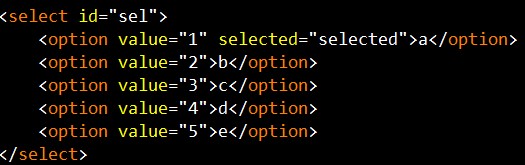
1. 获取选中项:
获取选中项的Value值:
$('select#sel option:selected').val();
或者
$('select#sel').find('option:selected').val();
获取选中项的text值:
$('select#seloption:selected').text();
或者
$('select#sel').find('option:selected').text();
2. 获取当前选中项的索引值:
$('select#sel').get(0).selectedIndex;
3. 获取当前option的最大索引值:
$('select#sel option:last').attr("index")
4. 获取DropdownList的长度:
$('select#sel')[0].options.length;
或者
$('select#sel').get(0).options.length;
5. 设置第一个option为选中值:
$('select#sel option:first').attr('selected','true')
或者
$('select#sel')[0].selectedIndex = 0;
6. 设置最后一个option为选中值:
$('select#sel option:last).attr('selected','true')
7. 根据索引值设置任意一个option为选中值:
$('select#sel')[0].selectedIndex =索引值;索引值=0,1,2....
8. 设置Value=4 的option为选中值:
$('select#sel').attr('value','4');
或者
$("select#sel option[value='4']").attr('selected', 'true');
9. 删除Value=3的option:
$("select#sel option[value='3']").remove();
10.删除第几个option:
$(" select#sel option ").eq(索引值).remove();索引值=0,1,2....
如删除第3个Radio:
$(" select#sel option ").eq(2).remove();
11.删除第一个option:
$(" select#sel option ").eq(0).remove();
或者
$("select#sel option:first").remove();
12. 删除最后一个option:
$("select#sel option:last").remove();
13. 删除dropdownlist:
$("select#sel").remove();
14.在select后面添加一个option:
$("select#sel").append("<option value='6'>f</option>");
15. 在select前面添加一个option:
$("select#sel").prepend("<option value='0'>0</option>");
16. 遍历option:
$(' select#sel option ').each(function (index, domEle) {
//写入代码
});
checkbox

1. 获取单个Checkbox选中项(三种写法):
$("input:checkbox:checked").val()
或者
$("input:[type='checkbox']:checked").val();
或者
$("input:[name='ck']:checked").val();
2. 获取多个checkbox选中项:
$('input:checkbox').each(function() {
if ($(this).attr('checked') ==true) {
alert($(this).val());
}
});
3. 设置第一个checkbox 为选中值:
$('input:checkbox:first').attr("checked",'checked');
或者
$('input:checkbox').eq(0).attr("checked",'true');
4. 设置最后一个checkbox为选中值:
$('input:radio:last').attr('checked', 'checked');
或者
$('input:radio:last').attr('checked', 'true');
5. 根据索引值设置任意一个checkbox为选中值:
$('input:checkbox).eq(索引值).attr('checked', 'true');索引值=0,1,2....
或者
$('input:radio').slice(1,2).attr('checked', 'true');
6. 选中多个checkbox:
同时选中第1个和第2个的checkbox:
$('input:radio').slice(0,2).attr('checked','true');
7. 根据Value值设置checkbox为选中值:
$("input:checkbox[value='1']").attr('checked','true');
8. 删除Value=1的checkbox:
$("input:checkbox[value='1']").remove();
9. 删除第几个checkbox:
$("input:checkbox").eq(索引值).remove();索引值=0,1,2....
如删除第3个checkbox:
$("input:checkbox").eq(2).remove();
10.遍历checkbox:
$('input:checkbox').each(function (index, domEle) {
//写入代码
});
11.全部选中
$('input:checkbox').each(function() {
$(this).attr('checked', true);
});
12.全部取消选择:
$('input:checkbox').each(function () {
$(this).attr('checked',false);
});
相关推荐
- jQuery下扩展插件和拓展函数的写法(匿名函数使用的典型例子) - Web前端
- jquery.cvtooltip.js 基于jquery的气泡提示插件 - Web前端
- jquery提升性能最佳实践小结 - Web前端
- 细说浏览器特性检测(2)-通用事件检测 - Web前端
- juqery 学习之三 选择器 简单 内容 - Web前端
- jquery获取input的value问题说明 - Web前端
- 基于jquery的图片懒加载js - Web前端
- JQUERY获取form表单值的代码 - Web前端
- 基于jQuery制作迷你背词汇工具 - Web前端
- jQuery基础知识filter()和find()实例说明 - Web前端
- 网页前端技术排行
-
- 1[Web前端]用javascript实现默认图片替代未显示的图片 - Web前端
- 2分析Iconfont-阿里巴巴矢量常用图标库 - Web前端
- 3jQuery实例教程:制作网页中可折叠的面板 - Web前端
- 4【第六章】Foundation之按钮和下拉功能 - Web前端
- 5基于jquery的滚动条滚动固定div(附演示下载) - Web前端
- 6分享精心挑选的12款优秀jQuery Ajax分页插件和教程 - Web前端
- 7jQuery编写widget的一些技巧分享 - Web前端
- 8jQuery实现鼠标移到元素上动态提示消息框效果 - Web前端
- 9在Mac/PC上远程调试iPhone/iPad上的网页 - Web前端
- 最近发表
-
- WordPress随机显示特色图片插件:Random Post Thumbnails
- KeePass实现Chrome浏览器自动填充密码方法一
- LNMP一键包nginx 301强制跳转到https教程
- KeePass实现Chrome浏览器自动填充密码方法二
- #建站# 免费的VPS管理软件Xshell8/Xftp8中文版下载
- 使用Xshell 8连接VPS教程_电脑登录vps的方法
- WordPress评论界面添加烟花????效果
- 不同浏览器书签同步方案:坚果云+Floccus_详细使用教程
- iOS端KeePassXC客户端APP:Strongbox Password Safe
- 给WordPress评论中的Gravatar头像图片添加ALT属性