


如何在HTML5 SVG上绘制三次贝塞尔曲线 - Web前端
作者:98wpeu发布时间:2026-09-10分类:网页前端技术浏览:125

文章“如何在SVG中创建复杂路径”对该<path>元素进行了研究,并展示了如何绘制一系列直线和圆弧以创建任何形状。(它通常用于复制字体,而无需下载完整的字体。)
该d属性提供了一些额外的技巧来绘制平滑曲线。在本文中,我们将讨论三次贝塞尔曲线,但您也可以参考“如何在svg图像上绘制二次贝塞尔曲线”中的一个简单选项。
什么是三次贝塞尔曲线?
您可能在桌面发布和图形包中遇到了三次贝塞尔曲线。它们定义了起点(P0)和终点(P3)。但是,虽然二次曲线使用一个控制点,三次贝塞尔曲线却具有两个:曲线的每一端(P1和P2)一条。
路径难题
三次贝塞尔曲线是使用C路径d属性中的指令定义的:
<path d="M100,250 C100,100 400,100 400,250" />
初始M指令将笔移动到第一点(100,250)。三个坐标遵循C:第一个控制点(100,100),第二个控制点(400,100)和最终终点(400,250)。
您也可以使用小写字母c表示相对坐标,而不是绝对坐标。以下曲线将是相同的,并且可能更容易编写:
<path d="M100,250 c0,-150 300,-150 300,0" />
最后,还有速记S和s指令(通常,小写选项表示相对坐标,而不是绝对坐标)。它们通过设置另一个终点及其关联的控制点,接受另外两个坐标以将多条曲线串在一起。假定起点控制点与上一条曲线上的终点控制点相同。例如,采用以下路径:
<path d="M100,250 C100,100 400,100 400,250 S700,400 700,250" />
如上所述,它绘制了从100,250(控制点的100,100)到400,250(控制点的400,100)的曲线。然后从400,250(控制点在不变400,100)到700,250(控制点在700,400)绘制另一条曲线:
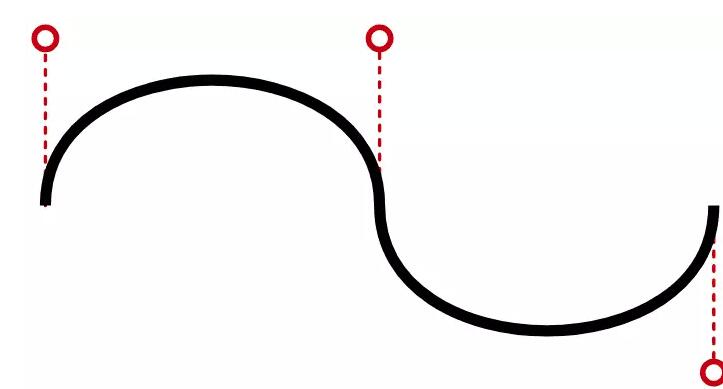
三次贝塞尔曲线可能很难编码和可视化,因此此快速生成工具将为您生成<path>代码:
<!DOCtype html><HTML lang="en"><head> <meta charset="UTF-8"> <link rel="apple-touch-icon" type="image/png" href="https://cpWEBassets.codepen.io/assets/favicon/Apple-touch-icon-5ae1a0698dcc2402e9712f7d01ed509a57814f994c660df9f7a952f3060705ee.png" /><meta name="APPle-mobile-web-app-title" content="CodePen">
<link rel="shortcut icon" type="image/x-icon" href="https://cpwebassets.codepen.io/assets/favicon/favicon-aec34940fbc1a6e787974dcd360f2c6b63348d4b1f4e06c77743096d55480f33.ico" />
<link rel="mask-icon" type="" href="HTTPS://cpwebassets.codepen.io/assets/favicon/logo-pin-8f3771b1072e3c38bd662872f6b673a722f4b3ca2421637d5596661b4e2132cc.SVG" color="#111" />
<meta charset="utf-8"> <meta name='viewport' content='width=device-width, initial-scale=1'>
<title>CodePen - SVG cubic bézIEr curve path creation tool</title>
<link rel="StyleSheet" media="screen" href="https://cpwebassets.codepen.io/assets/FullPage/fullpage-4de243a40619a967c0bf13b95e1ac6f8de89d943b7fc8710de33f681fe287604.CSS" /> <link href="HTTPs://fonts.googleAPIs.com/css?family=Lato:300,400,400italic,700,700italic,900,900italic&display=swap" rel="stylesheet" />
<link rel="Apple-touch-icon" type="image/png" href="https://cpwebassets.codepen.io/assets/favicon/apple-touch-icon-5ae1a0698dcc2402e9712f7d01ed509a57814f994c660df9f7a952f3060705ee.png" /><meta name="apple-mobile-web-app-title" content="CodePen">
<link rel="shortcut icon" type="image/x-icon" href="https://cpwebassets.codepen.io/assets/favicon/favicon-aec34940fbc1a6e787974dcd360f2c6b63348d4b1f4e06c77743096d55480f33.ico" />
<link rel="mask-icon" type="" href="https://cpwebassets.codepen.io/assets/favicon/logo-pin-8f3771b1072e3c38bd662872f6b673a722f4b3ca2421637d5596661b4e2132cc.svg" color="#111" />
<title>CodePen - SVG cubic bézier curve path creation tool</title> <script> if (document.location.search.match(/type=embed/gi)) { window.parent.postMessage("resize", "*"); }</script>
</head>
<body class="">
<div id="result-iframe-wrap" role="mAIn">
<iframe id="result" srcdoc="<!DOCTYPE html><html lang="en" >
<head>
<meta charset="UTF-8"> <link rel="apple-touch-icon" type="image/png" href="https://cpwebassets.codepen.io/assets/favicon/apple-touch-icon-5ae1a0698dcc2402e9712f7d01ed509a57814f994c660df9f7a952f3060705ee.png" /><meta name="apple-mobile-web-app-title" content="CodePen">
<link rel="shortcut icon" type="image/x-icon" href="https://cpwebassets.codepen.io/assets/favicon/favicon-aec34940fbc1a6e787974dcd360f2c6b63348d4b1f4e06c77743096d55480f33.ico" />
<link rel="mask-icon" type="" href="https://cpwebassets.codepen.io/assets/favicon/logo-pin-8f3771b1072e3c38bd662872f6b673a722f4b3ca2421637d5596661b4e2132cc.svg" color="#111" />
<title>CodePen - SVG cubic bézier curve path creation tool</title> <style>*, *:before, *:after { Box-sizing: border-box; padding: 0; margin: 0;}
html { height: 100%;}
body { height: 100%; font-family: Lato, helvetica, sans-serif; font-size: 100%; padding: 0; margin: 0; color: #333; background-color: #fff; overflow: hidden;}
#mysvg { display: block; width: auto; height: 100%; margin: 0; background: radial-gradient(ellipse at center, #fefefe 0%, #cbeeff 100%); border: 5px solid #333; touch-action: none;}
@media (max-aspect-ratio: 1/1) {
#mysvg { width: 100%; height: auto; }
}
#mysvg path { stroke-width: 10; stroke: #000; stroke-linecap: round; fill: none;}
#mysvg path.fill { fill: #3ff;}
#mysvg .control { stroke-width: 3; stroke: #c00; fill: #fff;}
#mysvg .control:hover, #mysvg .control.drag{ fill: #c00; cursor: move;}
#mysvg line{ stroke-width: 2; stroke: #999; stroke-linecap: round; stroke-dashArray: 5,5;}
#output { position: fixed; bottom: 10px; right: 10px; padding: 0.2em; background-color: rgba(255,255,255,0.9); border-radius: 5px;}
h1 { font-size: 1.2em;}
#path { font-family: monospace; font-size: 1em; padding: 0.3em; border: 1px solid #999; user-select: all;}</style>
<script> window.console = window.console || function(t) {};</script>
<script> if (document.location.search.match(/type=embed/gi)) { window.parent.postMessage("resize", "*"); }</script>
</head>
<body translate="no" > <svg xmlns="http://www.w3.org/2000/svg" id="mysvg" viewBox="0 0 500 500" PReserveAspectRatio="xMidYMid meet">
<title>SVG curve</title> <desc>example curves in SVG</desc>
<circle id="p1" cx="100" cy="250" r="30" class="control" /> <circle id="p2" cx="400" cy="250" r="30" class="control" />
<circle id="c1" cx="100" cy="100" r="20" class="control" /> <circle id="c2" cx="400" cy="100" r="20" class="control" />
<line id="l1" x1="100" y1="250" x2="100" y2="100" /> <line id="l2" x1="400" y1="250" x2="400" y2="100" />
<path id="curve" d="M100,250 C100,100 400,100 400,250" />
</svg>
<div id="output"> <h1>SVG Quadratic B&eacute;zier Curve</h1> <p id="path"></p></div> <script src="https://cpwebassets.codepen.io/assets/common/stopExecutionOntimeout-157cd5b220a5c80d4ff8e0e70ac069bffd87a61252088146915e8726e5d9f147.JS"></script>
<script id="rendered-js" >// initializeconstsvg = document.getElementById('mysvg'),NS = svg.getattribute('xmlns'),vb = svg.getAttribute('viewBox').split(' ').map(v => +v),box = { xMin: vb[0], xMax: vb[0] + vb[2] - 1, yMin: vb[1], yMax: vb[1] + vb[3] - 1 };
node = {};
'p1,p2,c1,c2,l1,l2,curve,path'.split(',').map(s => { node[s] = document.getElementById(s);});
// eventssvg.addEventListener('pointerdown', dragHandler);document.addEventlistener('pointermove', dragHandler);document.addEventListener('pointerup', dragHandler);
drawCurve();
// drag handlerlet drag;function dragHandler(event) {
event.preventDefault();
const target = event.target, type = event.type, svgP = svgPoint(svg, event.clientX, event.clientY);
// fill toggle if (!drag && type === 'pointerdown' && target === node.curve) {
node.curve.classlist.toggle('fill'); drawCurve();
}
// start drag if (!drag && type === 'pointerdown' && target.claSSList.contains('control')) {
drag = { node: target, start: getControlPoint(target), Cursor: svgP };
drag.node.classList.add('drag');
}
// move element if (drag && type === 'pointermove') {
updateElement( drag.node, { cx: Math.max(box.xMin, Math.min(drag.start.x + svgP.x - drag.cursor.x, box.xMax)), cy: Math.max(box.yMin, Math.min(drag.start.y + svgP.y - drag.cursor.y, box.yMax)) });
drawCurve();
}
// stop drag if (drag && type === 'pointerup') {
drag.node.classList.remove('drag'); drag = null;
}
}
// translate page to SVG co-ordinatefunction svgPoint(element, x, y) {
var pt = svg.createSVGPoint(); pt.x = x; pt.y = y; return pt.matrixtransform(element.getScreenCTM().inverse());
}
// upDate elementfunction updateElement(element, attr) {
for (a in attr) { let v = attr[a]; element.setAttribute(a, isNaN(v) ? v : Math.round(v)); }
}
// get control point locationfunction getControlPoint(circle) {
return { x: Math.round(+circle.getAttribute('cx')), y: Math.round(+circle.getAttribute('cy')) };
}
// update curvefunction drawCurve() {
const p1 = getControlPoint(node.p1), p2 = getControlPoint(node.p2), c1 = getControlPoint(node.c1); c2 = getControlPoint(node.c2);
// control line 1 updateElement( node.l1, { x1: p1.x, y1: p1.y, x2: c1.x, y2: c1.y });
// control line 2 updateElement( node.l2, { x1: p2.x, y1: p2.y, x2: c2.x, y2: c2.y });
// curve const d = `M${p1.x},${p1.y} C${c1.x},${c1.y} ${c2.x},${c2.y} ${p2.x},${p2.y}` + ( node.curve.classList.contains('fill') ? ' Z' : '');
updateElement(node.curve, { d });
node.path.textContent = `<path d="${d}" />`;
}//# sourceurl=pen.js </script>
</body>
</html> " sandbox="allow-downloads allow-FORMs allow-modals allow-pointer-lock allow-popups allow-presentation allow-scripts allow-top-navigation-by-User-activation" allow="accelerometer; camera; encrypted-media; geolocation; gyroscope; microphone; midi" allowTransparency="true" allowpaymentrequest="true" allowfullscreen="true" class="result-iframe"> </iframe>
</div></body></html>相应地将控制点拖到曲线的两端。单击曲线本身可切换填充效果,以添加结束Z指令。
请注意,此工具必须将DOM页面坐标转换为SVG坐标,以确保它可以在所有屏幕尺寸下使用。这可能比您预期的要复杂一些,因此请参阅“如何从dom转换为SVG坐标并再次返回”。
如果您想要一个更简单的选项,请尝试在SVG图像上创建二次Bézier曲线。
相关推荐
- 网络掉链子,没网或网不好,微信咋连服务器? - Web前端
- 手机“内存”被榨干,微信没资格启动 - Web前端
- 小程序怎么实现登录时获取用户手机号? - Web前端
- 微信登录时怎么获取用户信息?这些关键细节你得懂 - Web前端
- 微信小程序:先搞懂登录+用户信息的底层逻辑 - Web前端
- unknown cookie是什么?会影响浏览安全吗? - Web前端
- 先搞懂Page和Component是干啥的? - Web前端
- 开发网页端SVG编辑器要解决哪些核心问题? - Web前端
- 缩进结束后,cursor自动关闭,不用手动写close - Web前端
- 询问 SEO:最常见的 Hreflang 错误是什么以及如何审核它们? - Web前端
- 网页前端技术排行
-
- 1[Web前端]用javascript实现默认图片替代未显示的图片 - Web前端
- 2分析Iconfont-阿里巴巴矢量常用图标库 - Web前端
- 3jQuery实例教程:制作网页中可折叠的面板 - Web前端
- 4【第六章】Foundation之按钮和下拉功能 - Web前端
- 5基于jquery的滚动条滚动固定div(附演示下载) - Web前端
- 6分享精心挑选的12款优秀jQuery Ajax分页插件和教程 - Web前端
- 7jQuery编写widget的一些技巧分享 - Web前端
- 8jQuery实现鼠标移到元素上动态提示消息框效果 - Web前端
- 9在Mac/PC上远程调试iPhone/iPad上的网页 - Web前端
- 最近发表
-
- WordPress随机显示特色图片插件:Random Post Thumbnails
- KeePass实现Chrome浏览器自动填充密码方法一
- LNMP一键包nginx 301强制跳转到https教程
- KeePass实现Chrome浏览器自动填充密码方法二
- #建站# 免费的VPS管理软件Xshell8/Xftp8中文版下载
- 使用Xshell 8连接VPS教程_电脑登录vps的方法
- WordPress评论界面添加烟花????效果
- 不同浏览器书签同步方案:坚果云+Floccus_详细使用教程
- iOS端KeePassXC客户端APP:Strongbox Password Safe
- 给WordPress评论中的Gravatar头像图片添加ALT属性