


jQuery表单验证功能实例 - Web前端
作者:98wpeu发布时间:2026-08-20分类:网页前端技术浏览:153
导读:本文实例讲述了jQuery表单验证功能。分享给大家供大家参考。具体如下:这里使用JQuery实现的表单验证效果,以Ajax方式验证你的表单是否填写正确,如果验证不通过,会将表单元...
本文实例讲述了jQuery表单验证功能。分享给大家供大家参考。具体如下:
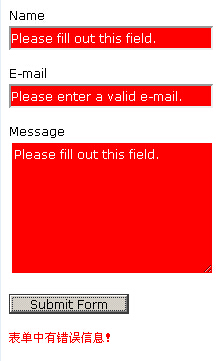
这里使用JQuery实现的表单验证效果,以Ajax方式验证你的表单是否填写正确,如果验证不通过,会将表单元素背景变成红色,并给出提示信息,简单实用,jQuery表单验证功能已经有很多了,本款表单验证特效看上去更简单,不懂ajax的朋友,或许直接套用即可实现无刷新表单验证功能。
运行效果截图如下:
在线演示地址如下:
http://demo.jb51.net/js/2015/jquery-table-form-check-codes/
具体代码如下:
<!DOCtype html>
<head>
<meta http-eqUIv="Content-Type" content="text/HTML; charset=utf-8" />
<title>jquery表单验证</title>
<style type="text/CSS">
body, input, Textarea {
 font-size:12px;
 line-height:18px;
 font-family:Verdana, Geneva, sans-serif;
}
input {width:200px;}
.submit {width:120px;}
#error {
 color:red;
 font-size:10px;
 display:none;
}
.needsfilled {
 background:red;
 color:white;
}
</style>
<script type="text/javascript" src="jquery-1.6.2.min.JS"></script>
<script type="text/JavaScript">
$(document).ready(function(){
 // Place ID's of all required fields here.
 required = ["name", "emAIl", "message"];
 // If using an ID other than #email or #error then Replace it here
 email = $("#email");
 errornotice = $("#error");
 // The text to show up within a fIEld when it is incorrect
 emptyerror = "Please fill out this field.";
 emailerror = "Please enter a valid e-mail.";
 $("#theFORM").submit(function(){
  //Validate required fields
  for (i=0;i<required.length;i++) {
   var input = $('#'+required[i]);
   if ((input.val() == "") || (input.val() == emptyerror)) {
    input.addClass("needsfilled");
    input.val(emptyerror);
    errornotice.fadeIn(750);
   } else {
    input.removeclass("needsfilled");
   }
  }
  // validate the e-mail.
  if (!/^([a-zA-Z0-9_\.\-])+\@(([a-zA-Z0-9\-])+\.)+([a-zA-Z0-9]{2,4})+$/.test(email.val())) {
   email.addClass("needsfilled");
   email.val(emailerror);
  }
  //if any inputs on the page have the class 'needsfilled' the form will not submit
  if ($(":input").hasClass("needsfilled")) {
   return false;
  } else {
   errornotice.hide();
   return true;
  }
 });
 // Clears any fields in the Form when the User clicks on them
 $(":input").focus(function(){
  if ($(this).hasClass("needsfilled") ) {
   $(this).val("");
   $(this).removeClass("needsfilled");
  }
 });
});
</script>
</head>
<body>
<form action="mail.PHP" id="theform" name="theform" method="post">
 <p><label for="name">Name</label><br /><input id="name" type="text" value="" name="name" /></p>
 <p><label for="email">E-mail</label><br /><input id="email" type="text" value="" name="email" /></p>
 <p><label for="message">Message</label><br /><textarea id="message" rows="7" cols="30" name="message"></textarea></p>
 <p><input class="submit" type="submit" name="submit" value="Submit Form" /></p>
 <p id="error">表单中有错误信息!</p>
</form>
</body>
</html>
希望本文所述对大家的JQuery程序设计有所帮助。
相关推荐
- unknown cookie是什么?会影响浏览安全吗? - Web前端
- 先搞懂Page和Component是干啥的? - Web前端
- 开发网页端SVG编辑器要解决哪些核心问题? - Web前端
- 缩进结束后,cursor自动关闭,不用手动写close - Web前端
- 询问 SEO:最常见的 Hreflang 错误是什么以及如何审核它们? - Web前端
- 用实例解析微信小程序中image的mode属性的基础知识和应用 - Web前端
- 为啥小程序Component要结合TypeScript开发? - Web前端
- 小程序里用canvas怎么绘制文字?从基础到进阶一次讲透 - Web前端
- 小程序里canvas toDataURL咋用?跨域、模糊、性能坑全解决 - Web前端
- 小程序webview里长按能识别二维码吗?怎么实现? - Web前端
- 网页前端技术排行
-
- 1[Web前端]用javascript实现默认图片替代未显示的图片 - Web前端
- 2分析Iconfont-阿里巴巴矢量常用图标库 - Web前端
- 3jQuery实例教程:制作网页中可折叠的面板 - Web前端
- 4【第六章】Foundation之按钮和下拉功能 - Web前端
- 5基于jquery的滚动条滚动固定div(附演示下载) - Web前端
- 6分享精心挑选的12款优秀jQuery Ajax分页插件和教程 - Web前端
- 7jQuery编写widget的一些技巧分享 - Web前端
- 8jQuery实现鼠标移到元素上动态提示消息框效果 - Web前端
- 9在Mac/PC上远程调试iPhone/iPad上的网页 - Web前端
- 最近发表
-
- WordPress随机显示特色图片插件:Random Post Thumbnails
- KeePass实现Chrome浏览器自动填充密码方法一
- LNMP一键包nginx 301强制跳转到https教程
- KeePass实现Chrome浏览器自动填充密码方法二
- #建站# 免费的VPS管理软件Xshell8/Xftp8中文版下载
- 使用Xshell 8连接VPS教程_电脑登录vps的方法
- WordPress评论界面添加烟花????效果
- 不同浏览器书签同步方案:坚果云+Floccus_详细使用教程
- iOS端KeePassXC客户端APP:Strongbox Password Safe
- 给WordPress评论中的Gravatar头像图片添加ALT属性