


checkbox 选中一个另一个checkbox也会选中的实现代码 - Web前端
作者:98wpeu发布时间:2026-08-15分类:网页前端技术浏览:199
导读:<!DOCtypehtmlPUBLIC"-//W3C//DTDxhtml1.0Strict//EN""http://www.w3.org/TR/xHTML...
<!DOCtype html PUBLIC "-//W3C//DTD xhtml 1.0 Strict//EN" "http://www.w3.org/TR/xHTML1/DTD/xhtml1-strict.dtd">
<html xmlns='HTTP://www.w3.org/1999/xhtml' xml:lang='en'>
<head>
<meta http-eqUIv='content-type' content='text/html; charset=utf-8' />
<meta http-equiv='content-language' content='en-us' />
<title>checkbox select</title>
<script type='text/javascript' src='JQuery-3.0.0.JS'></script>
<script type='text/JavaScript' >
$(document).ready(function(){
/****----全选----****/
//$('#check1').on('change',function(){
//$("#check1").bind("click",function(){
$('#check1').on('click',function(){
//方法一
if(this.checked==true){
$('input').prop('checked',true);
}
else{
$('input').PRop('checked',false);
}
if($(".do").text()=="全选"){
$(".do").text("取消");
}
else{
$(".do").text("全选");
}
//方法二
//$('input[type=Checkbox]').prop('checked',$(this).prop('checked'));
});
/****----第一列----****/
$('#checkl1').on('click',function(){
//方法一
if(this.checked==true){
$('#check11,#check21,#check31,#check41,#check51').prop('checked',true);
}
else{
$('#check11,#check21,#check31,#check41,#check51').prop('checked',false);
}
//方法二 如上
});
/****----第二列----****/
$('#checkl2').on('click',function(){
//方法一
if(this.checked==true){
$('#check12,#check22,#check32,#check42,#check52').prop('checked',true);
}
else{
$('#check12,#check22,#check32,#check42,#check52').prop('checked',false);
}
//方法二 如上
});
/****----第三列----****/
$('#checkl3').on('click',function(){
//方法一
if(this.checked==true){
$('#check13,#check23,#check33,#check43,#check53').prop('checked',true);
}
else{
$('#check13,#check23,#check33,#check43,#check53').prop('checked',false);
}
//方法二 如上
});
/****----第四列----****/
$('#checkl4').on('click',function(){
//方法一
if(this.checked==true){
$('#check14,#check24,#check34,#check44,#check54').prop('checked',true);
}
else{
$('#check14,#check24,#check34,#check44,#check54').prop('checked',false);
}
//方法二 如上
});
/****----第一行----****/
$('#checkh1').on('click',function(){
//方法一
if(this.checked==true){
$('#check11,#check12,#check13,#check14').prop('checked',true);
}else{
$('#check11,#check12,#check13,#check14').prop('checked',false);
}
//方法二 如上
});
/****----第二行----****/
$('#checkh2').on('click',function(){
//方法一
if(this.checked==true){
$('#check21,#check22,#check23,#check24').prop('checked',true);
}else{
$('#check21,#check22,#check23,#check24').prop('checked',false);
}
//方法二 如上
});
/****----第三行----****/
$('#checkh3').on('click',function(){
//方法一
if(this.checked==true){
$('#check31,#check32,#check33,#check34').prop('checked',true);
}else{
$('#check31,#check32,#check33,#check34').prop('checked',false);
}
//方法二 如上
});
/****----第四行----****/
$('#checkh4').on('click',function(){
//方法一
if(this.checked==true){
$('#check41,#check42,#check43,#check44').prop('checked',true);
}else{
$('#check41,#check42,#check43,#check44').prop('checked',false);
}
//方法二 如上
});
/****----第五行----****/
$('#checkH5').on('click',function(){
//方法一
if(this.checked==true){
$('#check51,#check52,#check53,#check54').prop('checked',true);
}else{
$('#check51,#check52,#check53,#check54').prop('checked',false);
}
//方法二 如上
});
});
</script>
</head>
<body>
<table style="width:50%;">
<tr>
<td><input type="checkbox" id = "check1" /><label for="check1" class="do">全选</label></td>
<td><input type="checkbox" id = "checkl1" /><label for="checkl1">第一列</label></td>
<td><input type="checkbox" id = "checkl2" /><label for="checkl2">第二列</label></td>
<td><input type="checkbox" id = "checkl3" /><label for="checkl3">第三列</label></td>
<td><input type="checkbox" id = "checkl4" /><label for="checkl4">第四列</label></td>
</tr>
<tr>
<td><input type="checkbox" id = "checkh1" /><label for="checkh1">第一行</label></td>
<td><input type="checkbox" id = "check11" /></td>
<td><input type="checkbox" id = "check12" /></td>
<td><input type="checkbox" id = "check13" /></td>
<td><input type="checkbox" id = "check14" /></td>
</tr>
<tr>
<td><input type="checkbox" id = "checkh2" /><label for="checkh2">第二行</label></td>
<td><input type="checkbox" id = "check21" /></td>
<td><input type="checkbox" id = "check22" /></td>
<td><input type="checkbox" id = "check23" /></td>
<td><input type="checkbox" id = "check24" /></td>
</tr>
<tr>
<td><input type="checkbox" id = "checkh3" /><label for="checkh3">第三行</label></td>
<td><input type="checkbox" id = "check31" /></td>
<td><input type="checkbox" id = "check32" /></td>
<td><input type="checkbox" id = "check33" /></td>
<td><input type="checkbox" id = "check34" /></td>
</tr>
<tr>
<td><input type="checkbox" id = "checkh4" /><label for="checkh4">第四行</label></td>
<td><input type="checkbox" id = "check41" /></td>
<td><input type="checkbox" id = "check42" /></td>
<td><input type="checkbox" id = "check43" /></td>
<td><input type="checkbox" id = "check44" /></td>
</tr>
<tr>
<td><input type="checkbox" id = "checkh5" /><label for="checkh5">第五行</label></td>
<td><input type="checkbox" id = "check51" /></td>
<td><input type="checkbox" id = "check52" /></td>
<td><input type="checkbox" id = "check53" /></td>
<td><input type="checkbox" id = "check54" /></td>
</tr>
</tbody>
</table>
</body>
</html>
效果图
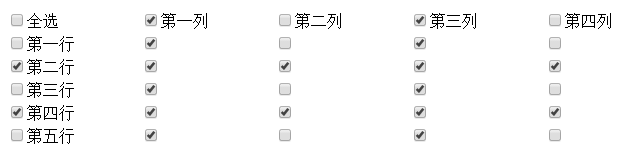
以上所述是小编给大家介绍的checkbox 选中一个另一个checkbox也会选中的实现代码的全部叙述,希望对大家有所帮助,如果大家想了解更多内容敬请关注脚本之家!
相关推荐
- jQuery下扩展插件和拓展函数的写法(匿名函数使用的典型例子) - Web前端
- jquery.cvtooltip.js 基于jquery的气泡提示插件 - Web前端
- jquery提升性能最佳实践小结 - Web前端
- 细说浏览器特性检测(2)-通用事件检测 - Web前端
- juqery 学习之三 选择器 简单 内容 - Web前端
- jquery获取input的value问题说明 - Web前端
- 基于jquery的图片懒加载js - Web前端
- JQUERY获取form表单值的代码 - Web前端
- 基于jQuery制作迷你背词汇工具 - Web前端
- jQuery基础知识filter()和find()实例说明 - Web前端
- 网页前端技术排行
-
- 1[Web前端]用javascript实现默认图片替代未显示的图片 - Web前端
- 2分析Iconfont-阿里巴巴矢量常用图标库 - Web前端
- 3jQuery实例教程:制作网页中可折叠的面板 - Web前端
- 4【第六章】Foundation之按钮和下拉功能 - Web前端
- 5基于jquery的滚动条滚动固定div(附演示下载) - Web前端
- 6分享精心挑选的12款优秀jQuery Ajax分页插件和教程 - Web前端
- 7jQuery编写widget的一些技巧分享 - Web前端
- 8jQuery实现鼠标移到元素上动态提示消息框效果 - Web前端
- 9在Mac/PC上远程调试iPhone/iPad上的网页 - Web前端
- 最近发表
-
- WordPress随机显示特色图片插件:Random Post Thumbnails
- KeePass实现Chrome浏览器自动填充密码方法一
- LNMP一键包nginx 301强制跳转到https教程
- KeePass实现Chrome浏览器自动填充密码方法二
- #建站# 免费的VPS管理软件Xshell8/Xftp8中文版下载
- 使用Xshell 8连接VPS教程_电脑登录vps的方法
- WordPress评论界面添加烟花????效果
- 不同浏览器书签同步方案:坚果云+Floccus_详细使用教程
- iOS端KeePassXC客户端APP:Strongbox Password Safe
- 给WordPress评论中的Gravatar头像图片添加ALT属性