


jquery实现移动端点击图片查看大图特效 - Web前端
作者:98wpeu发布时间:2026-08-10分类:网页前端技术浏览:150
导读:本文的需求很简单:点击图片查看大图,再点大图隐藏。多用于移动端,因为移动端屏幕小,可能需要查看大图。具体实现代码<!DOCtypehtml><HTM...
本文的需求很简单:点击图片查看大图,再点大图隐藏。多用于移动端,因为移动端屏幕小,可能需要查看大图。
具体实现代码
<!DOCtype html>
<HTML>
<meta charset="utf-8"/>
<head runat="server">
<title>JQuery点击图片查看大图by starof</title>
<style type="text/CSS">
.exampleImg { height:100px; cursor:pointer;}
</style>
<script src="http://code.jQuery.com/jquery-latest.JS"></script>
<script type="text/javascript">
//alert($);
// (function (window, undefined) {
// var Myjquery = function () {
// window.MyJQuery = window.$ = jQuery; window.$ = MyJQuery;
// };
// })(window);
// alert($);

$.fn.ImgZoomIn = function () {

bgstr = '<div id="ImgZoomInBG" style=" background:#000000; filter:Alpha(Opacity=70); opacity:0.7; position:fixed; left:0; top:0; z-index:10000; width:100%; height:100%; display:none;"><iframe src="about:blank" frameborder="5px" scrolling="yes" style="width:100%; height:100%;"></iframe></div>';
//alert($(this).attr('src'));
imgstr = '<img id="ImgZoomInImage" src="' + $(this).attr('src')+'" onclick=$(\'#ImgZoomInImage\').hide();$(\'#ImgZoomInBG\').hide(); style="Cursor:pointer; display:none; position:absolute; z-index:10001;" />';
if ($('#ImgZoomInBG').length < 1) {
$('body').append(bgstr);
}
if ($('#ImgZoomInImage').length < 1) {
$('body').APPend(imgstr);
}
else {
$('#ImgZoomInImage').attr('src', $(this).attr('src'));
}
//alert($(window).scrollLeft());
//alert( $(window).scrollTop());
$('#ImgZoomInImage').css('left', $(window).scrollLeft() + ($(window).width() - $('#ImgZoomInImage').width()) / 2);
$('#ImgZoomInImage').css('top', $(window).scrollTop() + ($(window).height() - $('#ImgZoomInImage').height()) / 2);
$('#ImgZoomInBG').show();
$('#ImgZoomInImage').show();
};

$(document).ready(function () {
$("#imgTest").bind("click", function () {
$(this).ImgZoomIn();
});
});
</script>
</head>
<body>
<div>
<!--第一种写法-->
<img class="exampleImg" src="images/03.jpg" id="imgTest"/>
<!--第二种写法-->
<img class="exampleImg" src="images/p1_nav2.png" onClick="$(this).ImgZoomIn();"/>
</div>
</body>
</html>

jquery实现移动端点击图片查看大图特效需要用到的技巧
需要点击图片中1、2、3、4四张小图分别查看大图,而下面左右按钮切换时是需要同时切换4张小图。
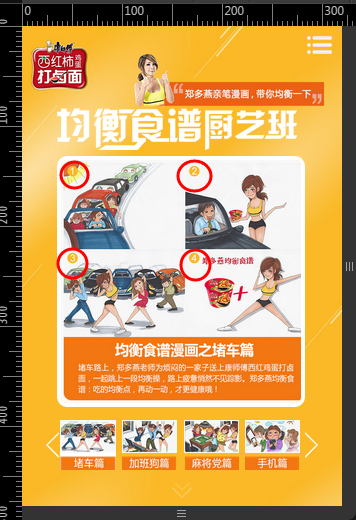
因为移动端无法添加热点,最终一个解决方法是使用四个A标签定位到左上角,右上角,左下角,右下角四个区域。
<dl>
  <dd style="display:block;">
    <img src="images/four-duche.jpg" onClick="$(this).ImgZoomIn();">
    <a href="JavaScript:;" src="images/11.jpg" class="topleft" onClick="$(this).ImgZoomIn();"></a>
    <a href="Javascript:;" src="images/12.jpg" class="toPRight" onClick="$(this).ImgZoomIn();"></a>
    <a href="javascript:;" src="images/13.jpg" class="bottomleft" onClick="$(this).ImgZoomIn();"></a>
    <a href="javascript:;" src="images/14.jpg" class="bottomright" onClick="$(this).ImgZoomIn();"></a>
  </dd>
  ...
</dl>
css
.topleft,.topright,.bottomleft,.bottomright{
  width:50%;
  height:50%;
  position:absolute;
}

.topleft{
  /*background-color:red;*/
  top:0;
  left:0;
}
.topright{
  /*background-color:green;*/
  top:0;
  right:0;
}
.bottomleft{
  /*background-color:blue;*/
  bottom:0;
  left:0;
}
.bottomright{
  /*background-color:yellow;*/
  bottom:0;
  right:0;
}
以上就是移动端点击图片查看大图的实现过程,希望对大家的学习有所帮助。
- 网页前端技术排行
-
- 1[Web前端]用javascript实现默认图片替代未显示的图片 - Web前端
- 2分析Iconfont-阿里巴巴矢量常用图标库 - Web前端
- 3jQuery实例教程:制作网页中可折叠的面板 - Web前端
- 4【第六章】Foundation之按钮和下拉功能 - Web前端
- 5基于jquery的滚动条滚动固定div(附演示下载) - Web前端
- 6jQuery编写widget的一些技巧分享 - Web前端
- 7分享精心挑选的12款优秀jQuery Ajax分页插件和教程 - Web前端
- 8在Mac/PC上远程调试iPhone/iPad上的网页 - Web前端
- 9jQuery实现鼠标移到元素上动态提示消息框效果 - Web前端
- 最近发表
-
- WordPress随机显示特色图片插件:Random Post Thumbnails
- KeePass实现Chrome浏览器自动填充密码方法一
- LNMP一键包nginx 301强制跳转到https教程
- KeePass实现Chrome浏览器自动填充密码方法二
- #建站# 免费的VPS管理软件Xshell8/Xftp8中文版下载
- 使用Xshell 8连接VPS教程_电脑登录vps的方法
- WordPress评论界面添加烟花????效果
- 不同浏览器书签同步方案:坚果云+Floccus_详细使用教程
- iOS端KeePassXC客户端APP:Strongbox Password Safe
- 给WordPress评论中的Gravatar头像图片添加ALT属性