


基于JQuery的asp.net树实现代码 - Web前端
作者:98wpeu发布时间:2026-07-15分类:网页前端技术浏览:189
导读:本tree的数据从sql的表中提取而来,sql表的结构如下:上面的表中 parentmodeuleID是代表父ID的标志,如果当前节点为根节点,则规定为0. 然后就是如何将...
本tree的数据从sql的表中提取而来,sql表的结构如下:
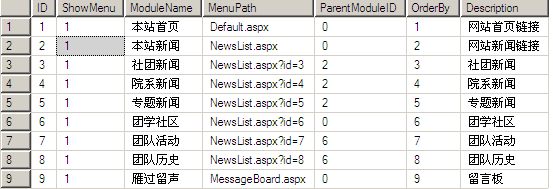
上面的表中 parentmodeuleID是代表父ID的标志,如果当前节点为根节点,则规定为0.
然后就是如何将上面的单表来组成树状结构.这时我们可以利用Ilist来加载数据库models来实现,具体Tree类如下:
using System;
using System.Collections.Generic;
using System.Linq;
using System.WEB;
using System.Web.UI;


namespace RolePermission1
{
 public class Tree
 {
  public int ModuleID { get; set; }

  public int ParentID { get; set; }

  public string ModulePath { get; set; }

  public String ModuleName { get; set; }


 }
}
然后就是在公共处理页面,将数据库的数据进行组织,形成符合JQuery tree的json格式,具体代码如下:
[WebMethod]
  public static string GetJSON()
  {
   string JSon = "[";
   IList<Tree> t = DB.returnParentTree();
   forEach (Tree model in t)
   {
    if (model != t[t.Count - 1])
    {
     json += GetJsonByModel(model) + ",";
    }
    else
    {
     json += GetJsonByModel(model);
    }
   }
   json += "]";
   json=json.Replace("'","\"");
   return json;
  }

  public static string GetJsonByModel(Tree t)
  {
   string json = "";
   bool flag = DB.isHaveChild(t.ModuleID);

   json = "{"
      + "'id':'" + t.ModuleID + "',"
      + "'text':'" + t.ModuleName + "',"
      + "'value':'" + t.ModuleID + "',"
      + "'showcheck':true,"
      + "'checkstate':'0',"
      + "'hasChildren':" + flag.toString().ToLower() + ","
      + "'isexpand':false,"
      + "'childnodes':"; /*奶奶的,这个地方一定要注意是Childnodes 而不是childNodes 害得我无语了*/
   if (!flag)
   {
    json += "null,";
    json += "'complete':false}";
   }
   else
   {
    json += "[";
    IList<Tree> list = DB.getChild(t.ModuleID);
    foreach (Tree tree in list)
    {
     if (tree != list[list.Count - 1])
     {
      json += GetJsonByModel(tree) + ",";
     }
     else
     {
      json += GetJsonByModel(tree);
     }
    }
    json += "],'complete':true}";
   }
   return json;
  }
上面就是利用递归的方式来将数据库的数据组合成合适的json数据,利用到的数据库操作类代码如下:
using System;
using System.Collections.Generic;
using System.Linq;
using System.Web;
using System.data;
using System.Data.Sqlclient;

namespace RolePermission1
{
 public class DB
 {

  public static readonly string connStr=System.Configuration.ConfigurationManager.APPSettings["connStr"];

  public static SqlConnection GetConn()
  {
   SqlConnection conn = new SqlConnection(connStr);
   conn.Open();
   return conn;
  }

  public static Datatable GetDT(string sql)
  {
   Datatable dt = new DataTABle();
   using (SqlConnection conn = DB.GetConn())
   {
    SqlDataAdapter sda = new SqlDataAdapter(sql, conn);
    sda.Fill(dt);
   }
   return dt;
  }

  public static IList<Tree> returnParentTree()
  {
   IList<Tree> t = new List<Tree>();
   string sql = "select * from Models where [ParentModuleID]=0 order by OrderBy asc";
   DataTable dt = GetDT(sql);
   foReach (DataRow dr in dt.Rows)
   {
    Tree tParent = new Tree();
    tParent.ModuleID = Int32.Parse(dr["ID"].ToString());
    tParent.ModuleName = dr["ModuleName"].ToString();
    tParent.ModulePath = dr["menuPath"].ToString();
    tParent.ParentID = Int32.Parse(dr["ParentModuleID"].ToString());
    t.Add(tParent);
   }
   return t;
  }

  public static bool isHaveChild(int id)
  {
   bool flag=false;
   string sql = "select ID from Models where ParentModuleID="+id+"";
   DataTable dt = GetDT(sql);
   if (dt.Rows.Count > 0)
   {
    flag = true;
   }
   return flag;

  }
  public static IList<Tree> getChild(int id)
  {
   IList<Tree> t = new List<Tree>();
   string sql = "select * from Models where ParentModuleID=" + id + "";
   DataTable dt = GetDT(sql);
   foreach (DataRow dr in dt.Rows)
   {
    Tree tParent = new Tree();
    tParent.ModuleID = Int32.Parse(dr["ID"].ToString());
    tParent.ModuleName = dr["ModuleName"].ToString();
    tParent.ModulePath = dr["MenuPath"].ToString();
    tParent.ParentID = Int32.Parse(dr["ParentModuleID"].ToString());
    t.Add(tParent);
   }
   return t;
  }

 }
}
好了,当json数据处理好以后,就可以将json打到前台,交给jQuery来处理了,
<%@ Page Language="c#" AutoeventWireup="true" codeBehind="Default.aspx.cs" Inherits="RolePermission1._Default" %>
<!DOCtype html PUBLIC "-//W3C//DTD xhtml 1.0 Transitional//EN" "http://www.w3.org/TR/xHTML1/DTD/xhtml1-transitional.dtd">
<html xmlns="HTTP://www.w3.org/1999/xhtml" >
<head runat="server">
 <title></title>
 <script src="jquery.treeview/lib/jquery.js" type="text/javascript"></script>
 <link href="JQuery.treevIEw/tree.CSS" rel="StyleSheet" type="text/css" />
 <script src="jquery.treeview/common.js" type="text/JavaScript"></script>
 <script src="jquery.treeview/jquery.tree.js" type="text/Javascript"></script>
</head>
<body>
 <FORM id="form1">
  <button id="showchecked" runat="server">Get selected Nodes</button>
 <div id="showTree" class="filetree">
 </div>
 </Form>
</body>
 <script type="text/javascript">
  $(document).ready(function() {
  $.Ajax({
   type: "post",
   contentType: "application/json;charset=utf-8",
   dataType: "json",
   url: "WebForm1.aspx/GetJson",
   success: function(data) {
    var o = { showcheck: true };
    o.data = eval(data.d);
    $("#showTree").treeview(o);
   }
   });
 });
 $("#showchecked").click(function(e) {
  var s = $("#showTree").getTSVs();
  if (s != Null)
   alert(s.join(","));
  else
   alert("NULL");
 });
 </script>
</html>
好了,来看看加载结果吧:
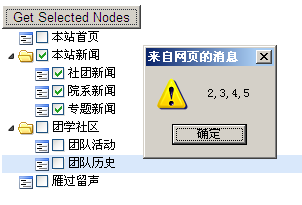
制作过程中需要注意的是:首先,递归必须正确;其次注意js大小写('ChildNodes'被我写成了'childNodes',花费了我一天时间才调整过来 晕哦) 再者就是可以直接调用公共页面的方法,只要在方法前面加上[webmethod]标记即可.
相关推荐
- jQuery实战之仿淘宝商城左侧导航效果 - Web前端
- jQuery-Tools-overlay 使用介绍 - Web前端
- 基于jquery的从一个页面跳转到另一个页面的指定位置的实现代码(带平滑移动的效果) - Web前端
- Jquery使用Firefox FireBug插件调试Ajax步骤讲解 - Web前端
- jQuery实用函数用法总结 - Web前端
- 使用jQuery实现dropdownlist的联动效果(sharepoint 2007) - Web前端
- 基于jQuery的合并表格中相同文本的相邻单元格的代码 - Web前端
- jQuery实战之品牌展示列表效果 - Web前端
- JQuery中$之选择器用法介绍 - Web前端
- jquery的index方法实现tab效果 - Web前端
- 网页前端技术排行
-
- 1[Web前端]用javascript实现默认图片替代未显示的图片 - Web前端
- 2分析Iconfont-阿里巴巴矢量常用图标库 - Web前端
- 3jQuery实例教程:制作网页中可折叠的面板 - Web前端
- 4【第六章】Foundation之按钮和下拉功能 - Web前端
- 5基于jquery的滚动条滚动固定div(附演示下载) - Web前端
- 6jQuery编写widget的一些技巧分享 - Web前端
- 7在Mac/PC上远程调试iPhone/iPad上的网页 - Web前端
- 8分享精心挑选的12款优秀jQuery Ajax分页插件和教程 - Web前端
- 9jQuery实现鼠标移到元素上动态提示消息框效果 - Web前端
- 最近发表
-
- WordPress随机显示特色图片插件:Random Post Thumbnails
- KeePass实现Chrome浏览器自动填充密码方法一
- LNMP一键包nginx 301强制跳转到https教程
- KeePass实现Chrome浏览器自动填充密码方法二
- #建站# 免费的VPS管理软件Xshell8/Xftp8中文版下载
- 使用Xshell 8连接VPS教程_电脑登录vps的方法
- WordPress评论界面添加烟花????效果
- 不同浏览器书签同步方案:坚果云+Floccus_详细使用教程
- iOS端KeePassXC客户端APP:Strongbox Password Safe
- 给WordPress评论中的Gravatar头像图片添加ALT属性