


Jquery+CSS 创建流动导航菜单 Fluid Navigation - Web前端
作者:98wpeu发布时间:2026-07-06分类:网页前端技术浏览:236
导读:那么我们应该如何实现流动导航菜单呢?一、效果图鼠标滑过menu,即Show提示信息。二、实现步骤1、CSS代码复制代码代码如下:menuBarHolder{width:...
那么我们应该如何实现流动导航菜单呢?
一、效果图
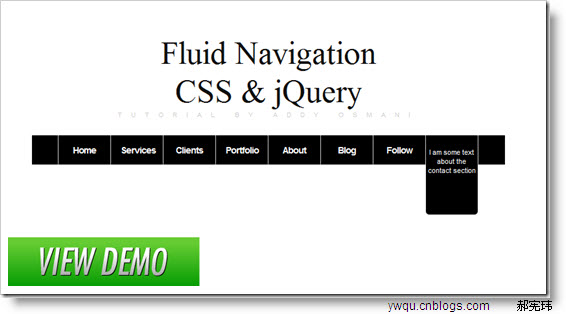
鼠标滑过menu,即Show提示信息。
二、实现步骤
1、CSS代码
复制代码 代码如下:
menuBarHolder { width: 730px; height:45px; background-color:#000; color:#fff; font-family:Arial; font-size:14px; margin-top:20px;}
#menuBarHolder ul{ list-style-type:none; display:block;}
#contAIner { margin-top:100px;}
#menuBar li{ float:left; padding:15px; height:16px; width:50px; border-right:1px solid #ccc; }
#menuBar li a{color:#fff; text-decoration:none; letter-spacing:-1px; font-weight:bold;}
.menuhover { background-color:#999;}
.firstchild { border-left:1px solid #ccc;}
.menUInfo { cursor:hand; background-color:#000; color:#fff;
width:74px; font-size:11px;height:100px; padding:3px; display:none;
position:absolute; margin-left:-15px; margin-top:-15px;
-moz-border-radius-bottomright: 5px;
-moz-border-radius-bottomleft: 5px;
-WEBkit-border-bottom-left-radius: 5px;
-webkit-border-bottom-right-radius: 5px;
-khtml-border-radius-bottomright: 5px;
-kHTML-border-radius-bottomleft: 5px;
border-radius-bottomright: 5px;
border-radius-bottomleft: 5px;
}
menuBarHolder: 菜单Menu的固定容器,宽度=730px。
menuinfo:控制提示信息的展示与否。
2、HTML代码
复制代码 代码如下:
<div id="menuBarHolder">
<ul id="menuBar">
<li class="firstchild"><a href="javascript:#">Home</a>
<div class="menuInfo">I am some text about the home section</div></li>
<li><a href="JavaScript:#">services</a>
<div class="menuInfo">I am some text about the services section</div></li>
<li><a href="Javascript:#">clients</a>
<div class="menuInfo">I am some text about the clients section</div></li>
<li><a href="javascript:#">Portfolio</a>
<div class="menuInfo">I am some text about the portfolio section</div></li>
<li><a href="javascript:#">About</a>
<div class="menuInfo">I am some text about the about section</div></li>
<li><a href="Javascript:#">Blog</a>
<div class="menuInfo">I am some text about the blog section</div></li>
<li><a href="javascript:#">Follow</a>
<div class="menuInfo">I am some text about the follow section</div></li>
<li><a href="javascript:#">contact</a>
<div class="menuInfo">I am some text about the contact section</div></li>
</ul>
</div>
UI LI元素:列表元素。
DIV元素:提示内容信息。
3、Javascript代码
复制代码 代码如下:
$(document).ready(function()
{
$('#menuBar li').click(function()
{
varurl = $(this).find('a').attr('href');
document.location.href = url;
});
$('#menuBar li').hover(function()
{
$(this).find('.menuInfo').slideDown();
},
function()
{
$(this).find('.menuInfo').slideUp();
});
});
click()、 hover():给Li元素绑定单击事件和鼠标滑过事件。
find()函数:搜索所有与指定表达式匹配的元素。这个函数是找出正在处理的元素的后代元素的好方法。
slideDown(speed, [callback]):通过高度变化(向下增大)来动态地显示所有匹配的元素,在显示完成后可选地触发一个回调函数。
slideUp(speed, [callback]):通过高度变化(向上减小)来动态地隐藏所有匹配的元素,在隐藏完成后可选地触发一个回调函数。
#menuBarHolder { width: 730px; height:45px; background-color:#000; color:#fff; font-family:Arial; font-size:14px; margin-top:20px;} #menuBarHolder ul{ list-style-type:none; display:block;} .firstchild { border-left:1px solid #ccc;} #container { margin-top:100px;} #menuBar li{ float:left; padding:15px; height:16px; width:50px; border-right:1px solid #ccc; } #menuBar li a{color:#fff; text-decoration:none; letter-spacing:-1px; font-weight:bold;} .menuHover { background-color:#999;} .menuInfo { Cursor:hand; background-color:#000; color:#fff; width:74px; font-size:11px;height:100px; padding:3px; display:none; position:absolute; margin-left:-15px; margin-top:-15px; -moz-border-radius-bottomright: 5px; -moz-border-radius-bottomleft: 5px; -webkit-border-bottom-left-radius: 5px; -webkit-border-bottom-right-radius: 5px; -khtml-border-radius-bottomright: 5px; -khtml-border-radius-bottomleft: 5px; border-radius-bottomright: 5px;border-radius-bottomleft: 5px; } h1 { font: 50px normal Georgia, 'times New Roman', Times, serif; color: #111; margin: 0; text-align: center; padding: 5px 0; } h1 small{ font: 0.2em normal Verdana, Arial, Helvetica, sans-serif; text-transform:uppercase; letter-spacing: 1.4em; display: block; color: #ccc; } $(document).ready(function() { $('#menuBar li').click(function() { var url = $(this).find('a').attr('href'); document.location.href = url; }); $('#menuBar li').hover(function() { $(this).find('.menuInfo').slideDown(); }, function() { $(this).find('.menuInfo').slideUp(); }); });
[Ctrl+A 全选 注:如需引入外部Js需刷新才能执行]
一、效果图
鼠标滑过menu,即Show提示信息。
二、实现步骤
1、CSS代码
复制代码 代码如下:
menuBarHolder { width: 730px; height:45px; background-color:#000; color:#fff; font-family:Arial; font-size:14px; margin-top:20px;}
#menuBarHolder ul{ list-style-type:none; display:block;}
#contAIner { margin-top:100px;}
#menuBar li{ float:left; padding:15px; height:16px; width:50px; border-right:1px solid #ccc; }
#menuBar li a{color:#fff; text-decoration:none; letter-spacing:-1px; font-weight:bold;}
.menuhover { background-color:#999;}
.firstchild { border-left:1px solid #ccc;}
.menUInfo { cursor:hand; background-color:#000; color:#fff;
width:74px; font-size:11px;height:100px; padding:3px; display:none;
position:absolute; margin-left:-15px; margin-top:-15px;
-moz-border-radius-bottomright: 5px;
-moz-border-radius-bottomleft: 5px;
-WEBkit-border-bottom-left-radius: 5px;
-webkit-border-bottom-right-radius: 5px;
-khtml-border-radius-bottomright: 5px;
-kHTML-border-radius-bottomleft: 5px;
border-radius-bottomright: 5px;
border-radius-bottomleft: 5px;
}
menuBarHolder: 菜单Menu的固定容器,宽度=730px。
menuinfo:控制提示信息的展示与否。
2、HTML代码
复制代码 代码如下:
<div id="menuBarHolder">
<ul id="menuBar">
<li class="firstchild"><a href="javascript:#">Home</a>
<div class="menuInfo">I am some text about the home section</div></li>
<li><a href="JavaScript:#">services</a>
<div class="menuInfo">I am some text about the services section</div></li>
<li><a href="Javascript:#">clients</a>
<div class="menuInfo">I am some text about the clients section</div></li>
<li><a href="javascript:#">Portfolio</a>
<div class="menuInfo">I am some text about the portfolio section</div></li>
<li><a href="javascript:#">About</a>
<div class="menuInfo">I am some text about the about section</div></li>
<li><a href="Javascript:#">Blog</a>
<div class="menuInfo">I am some text about the blog section</div></li>
<li><a href="javascript:#">Follow</a>
<div class="menuInfo">I am some text about the follow section</div></li>
<li><a href="javascript:#">contact</a>
<div class="menuInfo">I am some text about the contact section</div></li>
</ul>
</div>
UI LI元素:列表元素。
DIV元素:提示内容信息。
3、Javascript代码
复制代码 代码如下:
$(document).ready(function()
{
$('#menuBar li').click(function()
{
varurl = $(this).find('a').attr('href');
document.location.href = url;
});
$('#menuBar li').hover(function()
{
$(this).find('.menuInfo').slideDown();
},
function()
{
$(this).find('.menuInfo').slideUp();
});
});
click()、 hover():给Li元素绑定单击事件和鼠标滑过事件。
find()函数:搜索所有与指定表达式匹配的元素。这个函数是找出正在处理的元素的后代元素的好方法。
slideDown(speed, [callback]):通过高度变化(向下增大)来动态地显示所有匹配的元素,在显示完成后可选地触发一个回调函数。
slideUp(speed, [callback]):通过高度变化(向上减小)来动态地隐藏所有匹配的元素,在隐藏完成后可选地触发一个回调函数。
#menuBarHolder { width: 730px; height:45px; background-color:#000; color:#fff; font-family:Arial; font-size:14px; margin-top:20px;} #menuBarHolder ul{ list-style-type:none; display:block;} .firstchild { border-left:1px solid #ccc;} #container { margin-top:100px;} #menuBar li{ float:left; padding:15px; height:16px; width:50px; border-right:1px solid #ccc; } #menuBar li a{color:#fff; text-decoration:none; letter-spacing:-1px; font-weight:bold;} .menuHover { background-color:#999;} .menuInfo { Cursor:hand; background-color:#000; color:#fff; width:74px; font-size:11px;height:100px; padding:3px; display:none; position:absolute; margin-left:-15px; margin-top:-15px; -moz-border-radius-bottomright: 5px; -moz-border-radius-bottomleft: 5px; -webkit-border-bottom-left-radius: 5px; -webkit-border-bottom-right-radius: 5px; -khtml-border-radius-bottomright: 5px; -khtml-border-radius-bottomleft: 5px; border-radius-bottomright: 5px;border-radius-bottomleft: 5px; } h1 { font: 50px normal Georgia, 'times New Roman', Times, serif; color: #111; margin: 0; text-align: center; padding: 5px 0; } h1 small{ font: 0.2em normal Verdana, Arial, Helvetica, sans-serif; text-transform:uppercase; letter-spacing: 1.4em; display: block; color: #ccc; } $(document).ready(function() { $('#menuBar li').click(function() { var url = $(this).find('a').attr('href'); document.location.href = url; }); $('#menuBar li').hover(function() { $(this).find('.menuInfo').slideDown(); }, function() { $(this).find('.menuInfo').slideUp(); }); });
Fluid Navigationcss & JQueryTutorial by Addy Osmani
[Ctrl+A 全选 注:如需引入外部Js需刷新才能执行]
相关推荐
- 小程序里的block到底有啥用?怎么用能少踩坑? - Web前端
- 询问 SEO:XML 站点地图还是 HTML 站点地图更适合 SEO? - Web前端
- 微信小程序里按钮怎么居中?这些实用方法帮你轻松实现 - Web前端
- 微信小程序里button怎么实现click功能?从绑定到实战全解析 - Web前端
- 询问 SEO:数字公关或传统链接建设,哪个更好? - Web前端
- 小程序怎么做出用户爱用的爆款?看这几个行业案例就懂了! - Web前端
- 假设用Redis存token和过期时间会咋样? - Web前端
- Google Antigravity杀入AI编程!PK下Cursor、Trae,谁更强呢? - Web前端
- 微信小程序button type有哪些?怎么选怎么用更合适? - Web前端
- 微信小程序常见的安全雷区有哪些? - Web前端
- 网页前端技术排行
-
- 1[Web前端]用javascript实现默认图片替代未显示的图片 - Web前端
- 2分析Iconfont-阿里巴巴矢量常用图标库 - Web前端
- 3jQuery实例教程:制作网页中可折叠的面板 - Web前端
- 4【第六章】Foundation之按钮和下拉功能 - Web前端
- 5基于jquery的滚动条滚动固定div(附演示下载) - Web前端
- 6分享精心挑选的12款优秀jQuery Ajax分页插件和教程 - Web前端
- 7jQuery编写widget的一些技巧分享 - Web前端
- 8jQuery实现鼠标移到元素上动态提示消息框效果 - Web前端
- 9在Mac/PC上远程调试iPhone/iPad上的网页 - Web前端
- 最近发表
-
- WordPress随机显示特色图片插件:Random Post Thumbnails
- KeePass实现Chrome浏览器自动填充密码方法一
- LNMP一键包nginx 301强制跳转到https教程
- KeePass实现Chrome浏览器自动填充密码方法二
- #建站# 免费的VPS管理软件Xshell8/Xftp8中文版下载
- 使用Xshell 8连接VPS教程_电脑登录vps的方法
- WordPress评论界面添加烟花????效果
- 不同浏览器书签同步方案:坚果云+Floccus_详细使用教程
- iOS端KeePassXC客户端APP:Strongbox Password Safe
- 给WordPress评论中的Gravatar头像图片添加ALT属性