


jquery.simple.tree插件 更简单,兼容性更好的无限树插件 - Web前端
作者:98wpeu发布时间:2026-07-01分类:网页前端技术浏览:248
导读:效果如下:选择:拖拽:JQuery.simple.tree.官网地址:http://news.kg/wp-content/uploads/tree/(貌似已经打不开),不过...
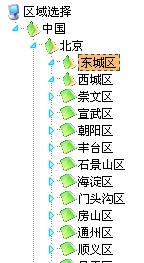
效果如下:
选择:
拖拽:
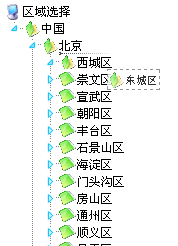
JQuery.simple.tree.官网地址: http://news.kg/wp-content/uploads/tree/(貌似已经打不开),不过因为操作比较简单,所以我们暂且用之。
前面讲过jQuery EasyUI Tree插件,简单易用,但经过测试仍有诸多缺点,
例如:
1、兼容ie8的Ajax有问题。
2、如果异步返回数据较慢,将可能导致加载失败。
3、我们只使用其中的Tree功能,但其体积实在有点庞大。...
而我们需要的是,兼容性好,异步,体积小(用Tree的场景实在比较少,所以还是专用的代码文件比较好。)
好了,我们开始jquery.simple.tree之旅:
首先,要加载文件,一共三个:CSS、jquery主文件、还有其本身的JS文件;
然后,是定义Tree的代码;
最后,写出这根树的根节点html代码;
前台代码如下:
复制代码 代码如下:
<!DOCtypeHTML PUBLIC "-//W3C//DTD xhtml 1.0 Transitional//EN" "HTTP://www.w3.org/TR/xhtml1/DTD/xhtml1-transitional.dtd">
<html xmlns="http://www.w3.org/1999/xhtml" >
<head runat="server">
<title>区域选择</title>
<link rel="StyleSheet" href="/js/simpletree/JQuery.simple.tree.css" />
<script type="text/javascript" src="/js/jquery1.4.2.min.js"></script>
<script type="text/JavaScript" src="/js/simpletree/jquery.simple.tree.js"></script>
<script type="text/Javascript">
var simpleTreeCollection;
$(document).ready(function(){
simpleTreeCollection = $('.simpleTree').simpleTree({
autoclose: true,
afterClick:function(node){
alert("您选择了:" + $('span:first',node).text() + "id为:" + $('span:first',node).attr("id").substr(2));//此处为何要“.substr(2)”,是因为特殊原因,稍后可以得到解释.如果你仅仅需要取文字,这里可以不取ID。
},
afterDblClick:function(node){
//alert("text-"+$('span:first',node).text());//双击事件
},
afterMove:function(destination, source, pos){
//alert("destination-"+destination.attr('id')+" source-"+source.attr('id')+" pos-"+pos);//拖拽事件
},
afterajax:function()
{
//alert('Loaded');
},
Animate:true
//,docToFolderConvert:true
});
});
</script>
</head>
<body>
<ul class="simpleTree">
<li class="root"><span>区域选择</span>
<ul>
<li id="root0" class="open"><span>中国</span>
<ul class="ajax">
<li id='0'>{url:/common/getGroupHtmlByPid.ashx?pid=0}</li>
</ul>
</li>
</ul>
</li>
</ul>
</body>
</html>
后台响应代码:
GetGroupHtmlByPid.ashx.cs
复制代码 代码如下:
public class GetGroupHtmlByPid : IHttpHandler
{
GroupManager group;
public voidPRocessRequest(HttPContext context)
{
context.Response.ContentType = "text/plAIn";
intparentId = -1;
int type = 0;
string resultStr = String.empty;
if (!context.Request.QueryString["pid"].IsnullOrempty())
{
Int32.TryParse(context.Request.QueryString["pid"], out parentId);
}
if (!context.Request.QueryString["type"].IsNullOrEmpty())
{
Int32.TryParse(context.Request.QueryString["type"], out type);
}
if (parentId >= 0)
{
try
{
group = new GroupManager((GroupType)type);
var subAg = group.AllGroups.Where(c => c.ParentId == parentId);
resultStr += "<ul>";
forEach (Base_group item in subAg)
{
resultStr += "<li id=\"" + item.GroupId + "\"><span id=\"1_" + item.GroupId + "\">" + item.GroupName + "</span>";//这里可以解释前台代码为何要.substr(2);
resultStr += "<ul class='ajax'><li>{url:/common/GetGroupHtmlByPid.ashx?pid=" + item.GroupId + "}</li></ul>";
resultStr += "</li>";
}
resultStr += "</ul>";
}
catch (Exception ex)
{
}
}
context.Response.Write(resultStr);
}
public bool IsReusable
{
get
{
returnfalse;
}
}
}
后台看起来有点别扭,因为这个插件本身只支持HTML节点加载的,不过网上有人进行扩展了,用了json,不过个人感觉这对速度影响实在微乎其微,还是直接封装出HTML代码的。
总结一下jquery.simple.tree插件的优缺点:
优点:体积小,兼容性高,可异步,支持拖拽。
缺点:如果初始化的时候就需要异步加载,则需要手动更改它的几行代码。例如我的例子中。
本插件还有一个特别的功能,支持拖拽,可以用于后台维护无限分类,非常方便,有待读者自己去发掘,希望本文能够抛砖引玉,对你有所帮助!
源插件下载地址:http://plugins.jquery.com/project/SimpleTree
我的修改后的下载地址:simpletree.rar
我只修改了2行代码,以便在第一次初始化时就加载异步的内容。
选择:
拖拽:
JQuery.simple.tree.官网地址: http://news.kg/wp-content/uploads/tree/(貌似已经打不开),不过因为操作比较简单,所以我们暂且用之。
前面讲过jQuery EasyUI Tree插件,简单易用,但经过测试仍有诸多缺点,
例如:
1、兼容ie8的Ajax有问题。
2、如果异步返回数据较慢,将可能导致加载失败。
3、我们只使用其中的Tree功能,但其体积实在有点庞大。...
而我们需要的是,兼容性好,异步,体积小(用Tree的场景实在比较少,所以还是专用的代码文件比较好。)
好了,我们开始jquery.simple.tree之旅:
首先,要加载文件,一共三个:CSS、jquery主文件、还有其本身的JS文件;
然后,是定义Tree的代码;
最后,写出这根树的根节点html代码;
前台代码如下:
复制代码 代码如下:
<!DOCtypeHTML PUBLIC "-//W3C//DTD xhtml 1.0 Transitional//EN" "HTTP://www.w3.org/TR/xhtml1/DTD/xhtml1-transitional.dtd">
<html xmlns="http://www.w3.org/1999/xhtml" >
<head runat="server">
<title>区域选择</title>
<link rel="StyleSheet" href="/js/simpletree/JQuery.simple.tree.css" />
<script type="text/javascript" src="/js/jquery1.4.2.min.js"></script>
<script type="text/JavaScript" src="/js/simpletree/jquery.simple.tree.js"></script>
<script type="text/Javascript">
var simpleTreeCollection;
$(document).ready(function(){
simpleTreeCollection = $('.simpleTree').simpleTree({
autoclose: true,
afterClick:function(node){
alert("您选择了:" + $('span:first',node).text() + "id为:" + $('span:first',node).attr("id").substr(2));//此处为何要“.substr(2)”,是因为特殊原因,稍后可以得到解释.如果你仅仅需要取文字,这里可以不取ID。
},
afterDblClick:function(node){
//alert("text-"+$('span:first',node).text());//双击事件
},
afterMove:function(destination, source, pos){
//alert("destination-"+destination.attr('id')+" source-"+source.attr('id')+" pos-"+pos);//拖拽事件
},
afterajax:function()
{
//alert('Loaded');
},
Animate:true
//,docToFolderConvert:true
});
});
</script>
</head>
<body>
<ul class="simpleTree">
<li class="root"><span>区域选择</span>
<ul>
<li id="root0" class="open"><span>中国</span>
<ul class="ajax">
<li id='0'>{url:/common/getGroupHtmlByPid.ashx?pid=0}</li>
</ul>
</li>
</ul>
</li>
</ul>
</body>
</html>
后台响应代码:
GetGroupHtmlByPid.ashx.cs
复制代码 代码如下:
public class GetGroupHtmlByPid : IHttpHandler
{
GroupManager group;
public voidPRocessRequest(HttPContext context)
{
context.Response.ContentType = "text/plAIn";
intparentId = -1;
int type = 0;
string resultStr = String.empty;
if (!context.Request.QueryString["pid"].IsnullOrempty())
{
Int32.TryParse(context.Request.QueryString["pid"], out parentId);
}
if (!context.Request.QueryString["type"].IsNullOrEmpty())
{
Int32.TryParse(context.Request.QueryString["type"], out type);
}
if (parentId >= 0)
{
try
{
group = new GroupManager((GroupType)type);
var subAg = group.AllGroups.Where(c => c.ParentId == parentId);
resultStr += "<ul>";
forEach (Base_group item in subAg)
{
resultStr += "<li id=\"" + item.GroupId + "\"><span id=\"1_" + item.GroupId + "\">" + item.GroupName + "</span>";//这里可以解释前台代码为何要.substr(2);
resultStr += "<ul class='ajax'><li>{url:/common/GetGroupHtmlByPid.ashx?pid=" + item.GroupId + "}</li></ul>";
resultStr += "</li>";
}
resultStr += "</ul>";
}
catch (Exception ex)
{
}
}
context.Response.Write(resultStr);
}
public bool IsReusable
{
get
{
returnfalse;
}
}
}
后台看起来有点别扭,因为这个插件本身只支持HTML节点加载的,不过网上有人进行扩展了,用了json,不过个人感觉这对速度影响实在微乎其微,还是直接封装出HTML代码的。
总结一下jquery.simple.tree插件的优缺点:
优点:体积小,兼容性高,可异步,支持拖拽。
缺点:如果初始化的时候就需要异步加载,则需要手动更改它的几行代码。例如我的例子中。
本插件还有一个特别的功能,支持拖拽,可以用于后台维护无限分类,非常方便,有待读者自己去发掘,希望本文能够抛砖引玉,对你有所帮助!
源插件下载地址:http://plugins.jquery.com/project/SimpleTree
我的修改后的下载地址:simpletree.rar
我只修改了2行代码,以便在第一次初始化时就加载异步的内容。
相关推荐
- 跨域请求之jQuery的ajax jsonp的使用解惑 - Web前端
- 基于JQuery的抓取博客园首页RSS的代码 - Web前端
- jQuery AjaxQueue改进步骤 - Web前端
- jquery利用event.which方法获取键盘输入值的代码 - Web前端
- select标签模拟/美化方法采用JS外挂式插件 - Web前端
- jquery 回车事件实现代码 - Web前端
- JQuery动态创建DOM、表单元素的实现代码 - Web前端
- 读jQuery之五(取DOM元素) - Web前端
- jquery中:input和input的区别分析 - Web前端
- Jsonp 跨域的原理以及Jquery的解决方案 - Web前端
- 网页前端技术排行
-
- 1[Web前端]用javascript实现默认图片替代未显示的图片 - Web前端
- 2分析Iconfont-阿里巴巴矢量常用图标库 - Web前端
- 3jQuery实例教程:制作网页中可折叠的面板 - Web前端
- 4【第六章】Foundation之按钮和下拉功能 - Web前端
- 5基于jquery的滚动条滚动固定div(附演示下载) - Web前端
- 6jQuery编写widget的一些技巧分享 - Web前端
- 7分享精心挑选的12款优秀jQuery Ajax分页插件和教程 - Web前端
- 8在Mac/PC上远程调试iPhone/iPad上的网页 - Web前端
- 9jQuery实现鼠标移到元素上动态提示消息框效果 - Web前端
- 最近发表
-
- WordPress随机显示特色图片插件:Random Post Thumbnails
- KeePass实现Chrome浏览器自动填充密码方法一
- LNMP一键包nginx 301强制跳转到https教程
- KeePass实现Chrome浏览器自动填充密码方法二
- #建站# 免费的VPS管理软件Xshell8/Xftp8中文版下载
- 使用Xshell 8连接VPS教程_电脑登录vps的方法
- WordPress评论界面添加烟花????效果
- 不同浏览器书签同步方案:坚果云+Floccus_详细使用教程
- iOS端KeePassXC客户端APP:Strongbox Password Safe
- 给WordPress评论中的Gravatar头像图片添加ALT属性