


基于jquery的自定义鼠标提示效果 jquery.toolTip - Web前端
作者:98wpeu发布时间:2026-06-25分类:网页前端技术浏览:210
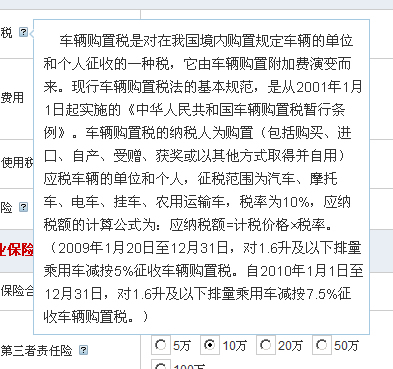
firefox或其它浏览器效果
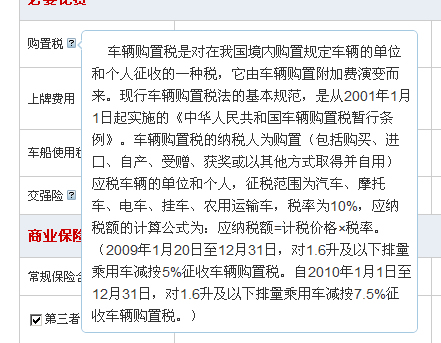
代码
复制代码 代码如下:
//版权 酷车中国 www.kuchechina.com
//作者 逐月 zhuyue.cnblogs.com
//演示 http://www.kuchechina.com/carstools/Default.aspx
JQuery.fn.toolTip = function() {
this.unbind().hover(
function(e) {
this.t = this.title;
this.title = '';
$('body').append( '<p id="p_toolTip" style="display:none; max-width:320px;text-align:left;"><img id="img_toolTip_Arrow" src="images/arrow.gif" />' + this.t + '</p>' );
var tip = $('p#p_toolTip').CSS({ "position": "absolute", "padding": "10px 5px 5px 10px", "left": "5px", "font-size": "14px", "background-color": "white", "border": "1px solid #a6c9e2","line-height":"160%", "-moz-border-radius": "5px", "-WEBkit-border-radius": "5px", "z-index": "9999"});
var target = $(this);
var position = target.position();
this.top = (position.top - 8); this.left = (position.left + target.width() + 5);
$('p#p_toolTip #img_toolTip_Arrow').css({"position": "absolute", "top": "8px", "left": "-6px" });
tip.css({"top": this.top+"px","left":this.left+"px"});
tip.fadeIn("slow");
},
function() {
this.title = this.t;
$("p#p_toolTip").fadeOut("slow").remove();
}
);
};
使用方法:
复制代码 代码如下:
<scripttype="text/javascript">
$(document).ready(function(){
$("#tootlsMAIn img[title]").toolTip();
});
</script>
可以利用jQuery选择器,选择带title属性的标签,当然可以适当的修改代码使适用带alt属性标签。
title属性支持简单html标签。如<br/>等。注意引号的使用
实现原理:
利用标签title属性,使hover事件取代默认鼠标事件,显示浮动层。this.unbind().hover 就是这句代码。jquery帮我们做好很多事情。堆积我们的现实代码就行。
程序员,文笔一般希望您能看懂。
代码下载
相关推荐
- jQuery学习笔记(1)--用jQuery实现异步通信(用json传值)具体思路 - Web前端
- Struts2的s:radio标签使用及用jquery添加change事件 - Web前端
- 利用webqq协议使用python登录qq发消息源码参考 - Web前端
- JQuery 图片的展开和伸缩实例讲解 - Web前端
- jQuery仿Excel表格编辑功能的实现代码 - Web前端
- 一个背景云变换js特效 鼠标移动背景云变化 - Web前端
- jQuery点击tr实现checkbox选中的方法 - Web前端
- jquery 事件冒泡的介绍以及如何阻止事件冒泡 - Web前端
- jQuery布局插件UI Layout简介及使用方法 - Web前端
- jquery1.83 之前所有与异步列队相关的模块详细介绍 - Web前端
- 网页前端技术排行
-
- 1[Web前端]用javascript实现默认图片替代未显示的图片 - Web前端
- 2分析Iconfont-阿里巴巴矢量常用图标库 - Web前端
- 3jQuery实例教程:制作网页中可折叠的面板 - Web前端
- 4【第六章】Foundation之按钮和下拉功能 - Web前端
- 5基于jquery的滚动条滚动固定div(附演示下载) - Web前端
- 6jQuery编写widget的一些技巧分享 - Web前端
- 7在Mac/PC上远程调试iPhone/iPad上的网页 - Web前端
- 8分享精心挑选的12款优秀jQuery Ajax分页插件和教程 - Web前端
- 9jQuery实现鼠标移到元素上动态提示消息框效果 - Web前端
- 最近发表
-
- WordPress随机显示特色图片插件:Random Post Thumbnails
- KeePass实现Chrome浏览器自动填充密码方法一
- LNMP一键包nginx 301强制跳转到https教程
- KeePass实现Chrome浏览器自动填充密码方法二
- #建站# 免费的VPS管理软件Xshell8/Xftp8中文版下载
- 使用Xshell 8连接VPS教程_电脑登录vps的方法
- WordPress评论界面添加烟花????效果
- 不同浏览器书签同步方案:坚果云+Floccus_详细使用教程
- iOS端KeePassXC客户端APP:Strongbox Password Safe
- 给WordPress评论中的Gravatar头像图片添加ALT属性