


JQuery Easyui Tree的oncheck事件实现代码 - Web前端
作者:98wpeu发布时间:2026-06-25分类:网页前端技术浏览:182
导读: 用firebug查看其生成html,发现其checkobx是假的,只是一个span,来回的变样式而已,汗复制代码代码如下:$(".tree-checkbox",tree).u...
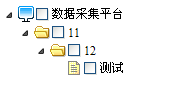
用firebug查看其生成html,发现其checkobx是假的,只是一个span,来回的变样式而已,汗
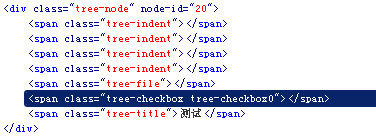
复制代码 代码如下:
$(".tree-checkbox", tree).unbind(".tree").bind("click.tree", function() {
if ($(this).hasclass("tree-Checkbox0")) {
$(this).removeClass("tree-checkbox0").addClass("tree-checkbox1");
} else {
if ($(this).hasClass("tree-checkbox1")) {
$(this).removeClass("tree-checkbox1").addClass("tree-checkbox0");
} else {
if ($(this).hasClass("tree-checkbox2")) {
$(this).removeClass("tree-checkbox2").addClass("tree-checkbox1");
}
}
}
_2eb($(this).parent());
_2ec($(this).parent());
returnfalse;
});
然后再看其onClick事件脚本
代码
复制代码 代码如下:
$(".tree-node", tree)
....
bind("click.tree", function() {
$(".tree-node-selected", tree).removeClass("tree-node-selected");
$(this).addClass("tree-node-selected");
if (opts.onClick) {
var _2ea = this;
var data = $.data(this, "tree-node");
opts.onClick.call(this, { id: data.id, text: data.text, attributes: data.attributes, target: _2ea });
}
})
相应的修改其check脚本
复制代码 代码如下:
$(".tree-checkbox", tree).unbind(".tree").bind("click.tree", function() {
if ($(this).hasClass("tree-checkbox0")) {
$(this).removeClass("tree-checkbox0").addClass("tree-checkbox1");
} else {
if ($(this).hasClass("tree-checkbox1")) {
$(this).removeClass("tree-checkbox1").addClass("tree-checkbox0");
} else {
if ($(this).hasClass("tree-checkbox2")) {
$(this).removeClass("tree-checkbox2").addClass("tree-checkbox1");
}
}
}
_2eb($(this).parent());
_2ec($(this).parent());
return false;
}).bind("click.tree", function() {//gzl增加
if ($(this).hasClass("tree-checkbox1") && opts.onCheck) {
var _2e9 = this;
var data = $.data(this, "tree-node");
opts.onCheck.call(this, { id: data.id, text: data.text, attributes: data.attributes, target: _2e9 });
}
});
可是怎么也取不到Data值,最后只好$(this).parent().click(),click事件加check是否变为选中判断,两个事件用一个方法,唉
多希望出个新版本,或者哪位大牛给改改,我能力太有限了。
相关推荐
- jQuery学习笔记(1)--用jQuery实现异步通信(用json传值)具体思路 - Web前端
- Struts2的s:radio标签使用及用jquery添加change事件 - Web前端
- 利用webqq协议使用python登录qq发消息源码参考 - Web前端
- JQuery 图片的展开和伸缩实例讲解 - Web前端
- jQuery仿Excel表格编辑功能的实现代码 - Web前端
- 一个背景云变换js特效 鼠标移动背景云变化 - Web前端
- jQuery点击tr实现checkbox选中的方法 - Web前端
- jquery 事件冒泡的介绍以及如何阻止事件冒泡 - Web前端
- jQuery布局插件UI Layout简介及使用方法 - Web前端
- jquery1.83 之前所有与异步列队相关的模块详细介绍 - Web前端
- 网页前端技术排行
-
- 1[Web前端]用javascript实现默认图片替代未显示的图片 - Web前端
- 2分析Iconfont-阿里巴巴矢量常用图标库 - Web前端
- 3jQuery实例教程:制作网页中可折叠的面板 - Web前端
- 4【第六章】Foundation之按钮和下拉功能 - Web前端
- 5基于jquery的滚动条滚动固定div(附演示下载) - Web前端
- 6jQuery编写widget的一些技巧分享 - Web前端
- 7在Mac/PC上远程调试iPhone/iPad上的网页 - Web前端
- 8分享精心挑选的12款优秀jQuery Ajax分页插件和教程 - Web前端
- 9jQuery实现鼠标移到元素上动态提示消息框效果 - Web前端
- 最近发表
-
- WordPress随机显示特色图片插件:Random Post Thumbnails
- KeePass实现Chrome浏览器自动填充密码方法一
- LNMP一键包nginx 301强制跳转到https教程
- KeePass实现Chrome浏览器自动填充密码方法二
- #建站# 免费的VPS管理软件Xshell8/Xftp8中文版下载
- 使用Xshell 8连接VPS教程_电脑登录vps的方法
- WordPress评论界面添加烟花????效果
- 不同浏览器书签同步方案:坚果云+Floccus_详细使用教程
- iOS端KeePassXC客户端APP:Strongbox Password Safe
- 给WordPress评论中的Gravatar头像图片添加ALT属性