


Ajax - 通过Ajax获取对象信息(基于XML实现) - Web前端
作者:98wpeu发布时间:2026-05-15分类:网页前端技术浏览:218
我们通过Ajax在服务器与客户端之间传输数据的时候,只能够接收到2种类型的信息:第一种是使用responsetext来获取纯文本信息,第二种是使用responsexml来获取XML格式的字符串文本。2种方式都是获取字符串,那么如果我们需要获取某个对象的信息该如何操作呢?
下面我们通过一个完整的例子来介绍基于XML格式的获取对象信息的方法。我们以PHP为服务器端代码,其它java、c#等编程语言的操作也基本类似。
在这个例子中,在服务器端有一个Person类,我们创建一个Person.class.php文件,文件中的代码如下:
/** Person.class.php  **/
<?php
  class Person{
    PRivate $id;
    private $name;
    private $age;

    /** 公开的get和set方法 **/
    public function getId(){
      return $this->id;
    }
    public function setId($id){
      $this->id = $id;
    }
    public function getName(){
      return $this->name;
    }
    public function setName($name){
      $this->name = $name;
    }
    public function getAge(){
      return $this->age;
    }
    public function setAge($age){
      $this->age = $age;
    }
  }
?>
然后,我们创建一个Personservice.php文件,这个文件是我们要通过ajax请求的文件。在这个文件中,我们创建了3个person对象,然后通过字符串拼接的方法将对象的信息拼接为XML格式的字符串。最后将这个字符串返回。
/** PersonService.php **/
<?php
  reqUIre_once 'Person.class.php';
  header("Content-type: text/xml; charset=utf-8");

  $person1 = new Person();
  $person1->setId(1);
  $person1->setName("Leon");
  $person1->setAge(23);

  $person2 = new Person();
  $person2->setId(2);
  $person2->setName("Ada");
  $person2->setAge(22);

  $person3 = new Person();
  $person3->setId(3);
  $person3->setName("Mike");
  $person3->setAge(25);

  //通过字符串来拼接xml文档
  $xml = "<persons>";
  $xml.="<person>";
  // person1
  $xml.="<id>";
  $xml.=$person1->getId();
  $xml.="</id>";

  $xml.="<name>";
  $xml.=$person1->getName();
  $xml.="</name>";

  $xml.="<age>";
  $xml.=$person1->getAge();
  $xml.="</age>";

  $xml.="</person>";

  // person2
  $xml.="<person>";

  $xml.="<id>";
  $xml.=$person2->getId();
  $xml.="</id>";

  $xml.="<name>";
  $xml.=$person2->getName();
  $xml.="</name>";

  $xml.="<age>";
  $xml.=$person2->getAge();
  $xml.="</age>";

  $xml.="</person>";

  //person3
  $xml.="<person>";

  $xml.="<id>";
  $xml.=$person3->getId();
  $xml.="</id>";

  $xml.="<name>";
  $xml.=$person3->getName();
  $xml.="</name>";

  $xml.="<age>";
  $xml.=$person3->getAge();
  $xml.="</age>";

  $xml.="</person>";

  $xml.= "</persons>";
  echo $xml;
?>注意,因为要返回XML格式,所以需要使用header()函数来注明Content-type为text/xml。
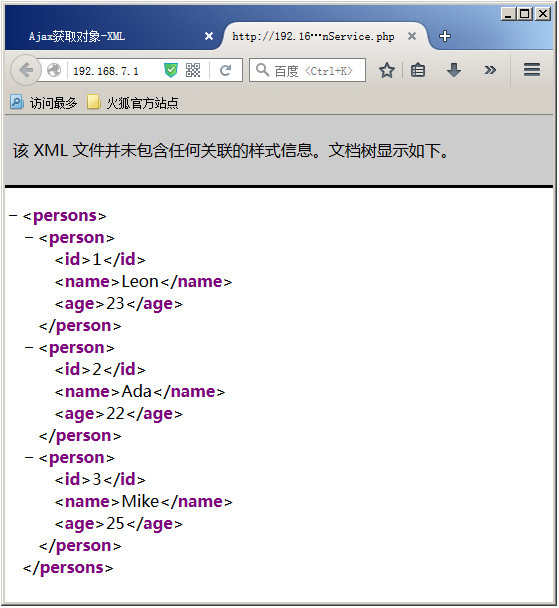
现在,在浏览器中直接访问这个php页面,就可以获取到一个XML格式的返回文档,如下图所示:
到此,服务器端代码就编写完毕了。下面我们接着编写客户端代码。我们使用一个叫show.html的静态页面来作为显示页面。当我们访问这个页面的时候,页面中有一个按钮,点击这个按钮就可以从服务端获取所有的Person对象,然后将Person对象的属性打印在页面的指定区域中。
下面是show.HTML文档的代码,代码十分简单,在<body>中有一个按钮和一个<div>容器。当我们点击按钮的时候,会从服务器端获取所有的Person对象,并将它们的属性打印在容器中。
<!DOCTYPE html>
<html lang="zh">
<head>
  <meta charset="UTF-8">
  <title>Ajax获取对象-基于XML方式</title>
</head>
<body>
  <button id="BTn">获取Person对象数据</button>
  <div id="contAIner"></div>
</body>
</html>
接下来我们开始写javascript代码。首先我们在页面加载完成之后调用init函数。在init函数中通过getPerson()方法完成Ajax调用。
<script type="text/JavaScript">
  window.onload = init;
  function init(){
    document.getElementById("btn").onclick = getPerson;
  }
</script>
根据上一篇文章中介绍的完成一个Ajax请求需要3个步骤:
1、创建XMLHttpRequest对象
2、检测XMLhttpRequest对象的状态,在合适的时候处理
3、发送请求
所以,getPerson函数应该像下面的样子:
function getPerson(){
  //1、获取XMLHTTPRequest对象
  var xhr = createXMLHttpRequest();
  //2、通过xhr对象打开页面
  xhr.onreadystatechange = function(){
    //3、处理请求
    if(xhr.readyState == 4 && xhr.status == 200){
      //3.1、获取xml节点
      //3.2、循环获取person的信息,并组装为xml格式
      //3.3、将person数据写入container容器中
    }
  }
  xhr.open("post","PersonService.php",true);
  xhr.setRequestHeader("Content-type","APPlication/x-www-FORM-urlencoded");
  xhr.send();
}
// 获取XMLHttpRequest对象
function createXMLHttpRequest(){
  var xhr;
  //ie5和IE6
  if(window.ActiveXObject){
    try{
      xhr = new ActiveXObject(microsoft.XMLHTTP)
    }catch(e){
      xhr = new ActiveXObject("Msxml2.XMLHTTP");
    }
  }else if(window.XMLHttpRequest){
    //其它主流浏览器
    xhr = new XMLHttpRequest();
  }else{
    alert("你使用的浏览器不支持XMLHttpRequest!");
    return false;
  }
  return xhr;
}注意,xhr.open()方法中我们使用的提交方式为POST方式。这种方式需要调用xhr.setRequestHeader()方法来设置请求头的Content-type。如果你的请求中带有参数,可以在send()方法中传入。例如下面的代码:
xhr.open("POST","test.php",true);
xhr.setRequestHeader("Content-type","application/x-www-form-urlencoded");
xhr.send("id=1&name=Leon");在xhr对象的readyState为4并且status为200的时候,说明Ajax请求结束并且没有出错,此时,我们可以处理返回的响应信息。
xhr.onreadystatechange = function(){
  //3、处理请求
  if(xhr.readyState == 4 && xhr.status == 200){
    //3.1、获取xml节点
    var xmlDoc = xhr.responseXML;
    var persons = xmlDoc.getElementsByTagName("person");
    var nodes = "";
    //3.2、循环获取person的信息,并组装为xml格式
    for(var i = 0; i < persons.length; i++){
      nodes += getvalueByprop(persons[i],"id") + "------" +
           getValueByProp(persons[i],"name") + "------" +
           getValueByProp(persons[i],"age") + "<br>";
    }
    //3.3、将person数据写入container容器中
    document.getElementById("container").innerHTML = nodes;
  }
}上面的代码中,首先通过xhr.responseXML获取返回的XML文档。然后获取这个XML文档中的所有person标签中的内容,最后通过一个for循环将获取的person对象的属性和值拼接为一个字符串,并把它们写入到container容器中。
到这里,一个完整的基于XML格式通过Ajax获取对象属性的例子就完成了。完整的客户端Javascript代码如下:
/** 基于XML格式的Ajax请求客户端javascript代码 **/

<script type="text/Javascript">
  window.onload = init;
  function init(){
    document.getElementById("btn").onclick = getPerson;
  }
  function getPerson(){
    //1、获取XMLHttpRequest对象
    var xhr = createXMLHttpRequest();
    //2、通过xhr对象打开页面
    xhr.onreadystatechange = function(){
      //3、处理请求
      if(xhr.readyState == 4 && xhr.status == 200){
        //3.1、获取xml节点
        var xmlDoc = xhr.responseXML;
        var persons = xmlDoc.getElementsByTagName("person");
        var nodes = "";
        //3.2、循环获取person的信息,并组装为xml格式
        for(var i = 0; i < persons.length; i++){
          nodes += getValueByProp(persons[i],"id") + "------" +
               getValueByProp(persons[i],"name") + "------" +
               getValueByProp(persons[i],"age") + "<br>";
        }
        //3.3、将person数据写入container容器中
        document.getElementById("container").innerHTML = nodes;
      }
    }
    xhr.open("POST","PersonService.php",true);
    xhr.setRequestHeader("Content-type","Application/x-www-Form-urlencoded");
    xhr.send();
  }
  // 通过属性获取对象值的方法
  function getValueByProp(node,prop){
    return (node.getElementsByTagName(prop))[0].firstChild.nodeValue;
  }
  // 获取XMLHttpRequest对象
  function createXMLHttpRequest(){
    var xhr;
    //IE5和IE6
    if(window.ActiveXObject){
      try{
        xhr = new ActiveXObject(Microsoft.XMLHTTP)
      }catch(e){
        xhr = new ActiveXObject("Msxml2.XMLHTTP");
      }
    }else if(window.XMLHttpRequest){
      //其它主流浏览器
      xhr = new XMLHttpRequest();
    }else{
      alert("你使用的浏览器不支持XMLHttpRequest!");
      return false;
    }
    return xhr;
  }
</script>
返回javascript教程主目录>>
相关推荐
- jQuery下扩展插件和拓展函数的写法(匿名函数使用的典型例子) - Web前端
- jquery.cvtooltip.js 基于jquery的气泡提示插件 - Web前端
- jquery提升性能最佳实践小结 - Web前端
- 细说浏览器特性检测(2)-通用事件检测 - Web前端
- juqery 学习之三 选择器 简单 内容 - Web前端
- jquery获取input的value问题说明 - Web前端
- 基于jquery的图片懒加载js - Web前端
- JQUERY获取form表单值的代码 - Web前端
- 基于jQuery制作迷你背词汇工具 - Web前端
- jQuery基础知识filter()和find()实例说明 - Web前端
- 网页前端技术排行
-
- 1[Web前端]用javascript实现默认图片替代未显示的图片 - Web前端
- 2分析Iconfont-阿里巴巴矢量常用图标库 - Web前端
- 3jQuery实例教程:制作网页中可折叠的面板 - Web前端
- 4【第六章】Foundation之按钮和下拉功能 - Web前端
- 5基于jquery的滚动条滚动固定div(附演示下载) - Web前端
- 6分享精心挑选的12款优秀jQuery Ajax分页插件和教程 - Web前端
- 7jQuery编写widget的一些技巧分享 - Web前端
- 8jQuery实现鼠标移到元素上动态提示消息框效果 - Web前端
- 9在Mac/PC上远程调试iPhone/iPad上的网页 - Web前端
- 最近发表
-
- WordPress随机显示特色图片插件:Random Post Thumbnails
- KeePass实现Chrome浏览器自动填充密码方法一
- LNMP一键包nginx 301强制跳转到https教程
- KeePass实现Chrome浏览器自动填充密码方法二
- #建站# 免费的VPS管理软件Xshell8/Xftp8中文版下载
- 使用Xshell 8连接VPS教程_电脑登录vps的方法
- WordPress评论界面添加烟花????效果
- 不同浏览器书签同步方案:坚果云+Floccus_详细使用教程
- iOS端KeePassXC客户端APP:Strongbox Password Safe
- 给WordPress评论中的Gravatar头像图片添加ALT属性